
ProfileUnity™
Unified User & Application Management for Azure Virtual Desktop, Windows 365, physical PCs and legacy VDI.
Modern user management extends beyond profiles
New workspace initiatives often add cost and complexity without the right user management approach.
2.5 Hours
Time saved per user during workspace migration
70 GB
Average reduction in user profile storage
Consolidate 2–3 Legacy Products
With comprehensive user management
Struggling to keep user sessions consistent, secure, and easy to manage?
Modern environments change constantly—devices, locations, OS versions, and platforms. ProfileUnity brings order with a universal profile and context-aware control that travels with the user.
Users expect the same settings and data every login. Deliver a familiar experience—even in non-persistent workspaces.
Many Group Policy settings have no Entra ID equivalent. Close the gap with context-aware policy based on location, device, time, and more.
Automate migrations and keep profiles resilient with adaptive logins, redirection options, and reporting that verifies completion.
When laptops go offline, so does application access. Your remote workforce loses productivity waiting for connectivity.
One Solution. Every User. Any Workspace.
ProfileUnity unifies user profile management, context-aware policy, and application access control in one platform-agnostic solution—across physical PCs, legacy VDI such as Citrix and Omnissa desktops, Azure Virtual Desktop and Windows 365. It works alongside Microsoft FSLogix and Intune. Maintain consistent sessions, automate Windows 11 onboarding, and keep users productive through change.
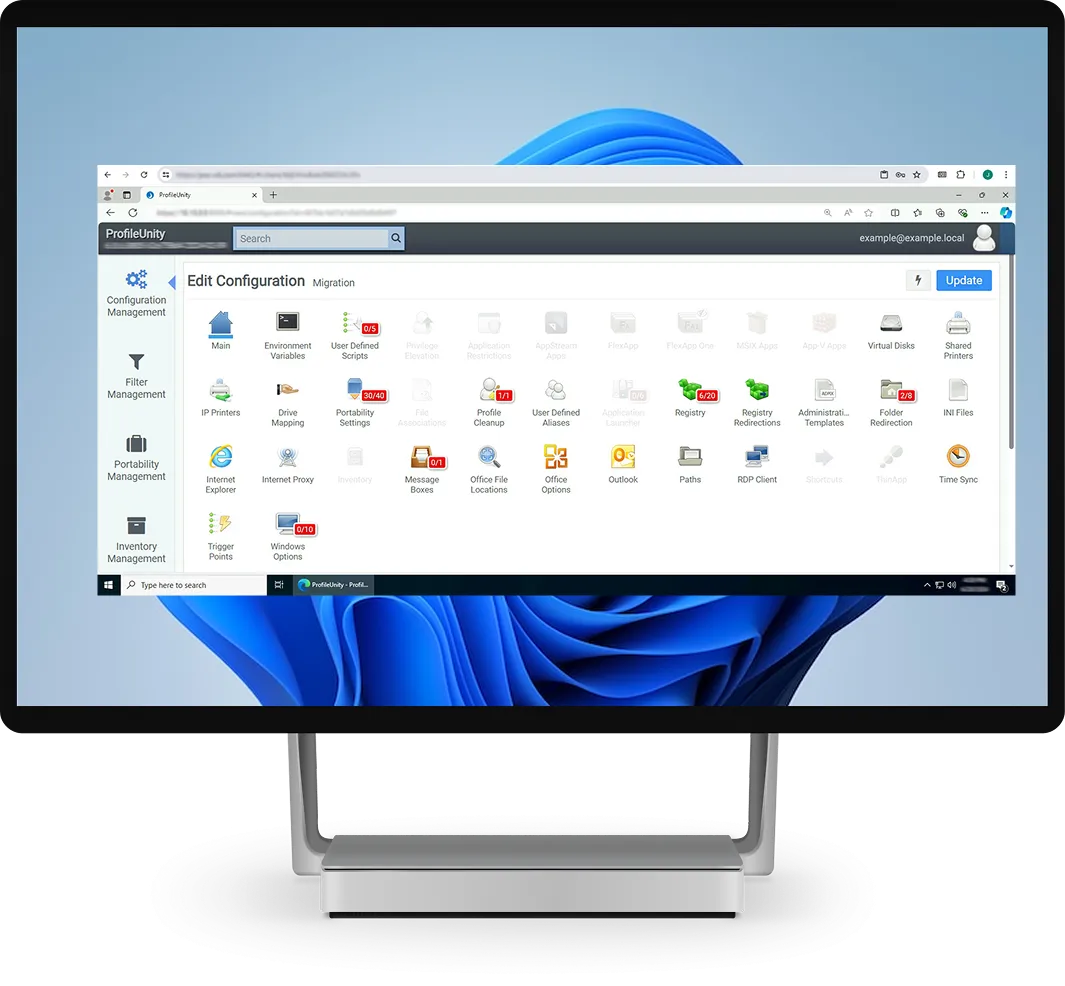
Complete user environment management for every user, on every workspace.
-
Universal profile across Windows OS versions and desktop platforms
-
Improve reliability and reduce profile corruption risk
-
Sync user-authored data to cloud or on-prem storage
-
Granular context filters and trigger points
-
Migration reporting to verify completion
Universal Profile
ProfileDisk Control (Works Alongside FSLogix)
Context-Aware Policy
Peripherals & Printer Assignment
Automated Windows Migrations
1
Omnipresent Profile
ProfileUnity by 

Hundreds of Context-Aware Filters
Universal Profile
Simply put: control
Prevent Issues
Centralize app rights, restrictions, and privilege elevation.
Role-based access & summary reports.
Built for Azure Virtual Desktop
and Windows 365
Migrate Users to the Cloud
- Move user profiles and data from physical PCs and legacy VDI such as Citrix and Omnissa desktops to AVD and Windows 365
- Migrate profiles across Windows versions, including Windows 10 to Windows 11
- Sync user-authored data to cloud or on-premises storage
- Verify every user moved with migration completion reporting
Fast, Consistent Sessions
- Works alongside FSLogix, with ProfileDisk control for large profiles
- Deliver the same settings and data at every login, even in pooled, non-persistent AVD host pools
- Shrink profile storage and reduce profile corruption risk
- Assign FlexApp™ applications, printers and settings by user, group, device and location
- One universal profile across AVD, Windows 365 and physical PCs
Azure Benefit Eligible: Use Your Azure Commitment
ProfileUnity and FlexApp are available on Microsoft Azure Marketplace. Eligible purchases count toward your Microsoft Azure Consumption Commitment (MACC), so you can put committed Azure spend to work on user environment management and application delivery, billed through your Azure account.
Group Policy for the Entra ID Era
As organizations move to Microsoft Entra ID–joined devices managed by Intune, Group Policy Preferences—which depend on Active Directory—no longer apply. ProfileUnity fills that gap alongside Intune, delivering the user settings people depend on, with or without a domain. Read how it works.
Drive mappings, printers, shortcuts, environment variables, registry settings, Start Menu layouts and scheduled tasks for Entra ID–joined, hybrid and domain-joined devices.
Bring existing ADMX-based configurations forward instead of rebuilding them by hand or maintaining a pile of scripts.
Apply settings by user, group membership, device attributes, IP address, location and time of day—so every user gets exactly the right configuration.
Intune manages the device; ProfileUnity manages the user experience—online or offline, on physical PCs, Azure Virtual Desktop and Windows 365.
Secure by Design
Reduce exposure and tighten governance with context-aware enforcement. Control what users can run, when they can run it, and how privileges are applied—while keeping the experience seamless.
Improved Security & Compliance
Address application vulnerabilities with specialized security features.
-
Application rights management to restrict or cloak apps
-
Privilege controls to grant admin rights only when appropriate
-
Context enforcement for compliance, licensing, and security
Works With Your Infrastructure

Workspace & Identity
- Mixed Windows OS environments (including Windows 10/11)
- Context-aware policy for Active Directory and Microsoft Entra ID
- Location-aware peripherals and printers
Application Ecosystem
- Context-aware deployment for FlexApp™, MSIX, App-V and Omnissa ThinApp
- A modern path forward from App-V infrastructure with context-aware delivery
- Support cloud app environments (including Amazon WorkSpaces Applications)
Liquidware Value Calculator
No consultants, no waiting. The Liquidware Value Calculator quickly shows your potential savings, efficiency gains, and ROI in under 60 seconds.
One of our core values is to ‘simplify IT management’ and FlexApp fits perfectly with that.

Ready to Simplify User Management?
Start your trial today.
ProfileUnity is part of Liquidware Essentials, alongside FlexApp and Stratusphere™ UX. Helping organizations manage their workspaces since 2009, Liquidware stands with every customer around the globe.
ProfileUnity uses a universal profile spanning multiple Windows OS versions and desktop platforms, adds ProfileDisk control for large profiles, and integrates with FlexApp so admins can target applications to users with the right access.
Start with a trial or evaluation option to validate fit in your environment before committing.
Use the Liquidware Value Calculator to estimate savings and operational impact in under a minute.