
CommandCTRL™
Real-Time DEX Diagnostics & Remediation—Fully SaaS—across Azure Virtual Desktop, Windows 365, physical PCs and legacy VDI.
Control your DEX environment at-a-glance with real-time data, diagnostics, and remediation.
Gain instant visibility across all desktops globally and resolve issues quickly with AI-assisted insights, DVR-style playback, and remote remediation—without slowing users down.
Instant visibility
DVR-style root cause
Faster resolution
Resolve DEX issues faster with real-time visibility, playback, and remediation.
Struggling to remediate DEX disruptions in real time—without interrupting users?
In modern digital workspaces, issues escalate fast. CommandCTRL shifts support from reactive firefighting to real-time remediation and optimization.
Enabling troubleshooting across physical, virtual, and cloud desktops eliminates blind spots and delays.
With point-in-time contexts, teams can rapidly resolve incidents.
Seamlessly resolve issues without the need to take control or schedule downtime.
One SaaS Console for Real-Time Data, Diagnostics, and Remediation
CommandCTRL delivers at-a-glance visibility and rapid remote remediation for any desktop, any user, anywhere—helping admins identify bottlenecks, take action immediately, and keep users productive.
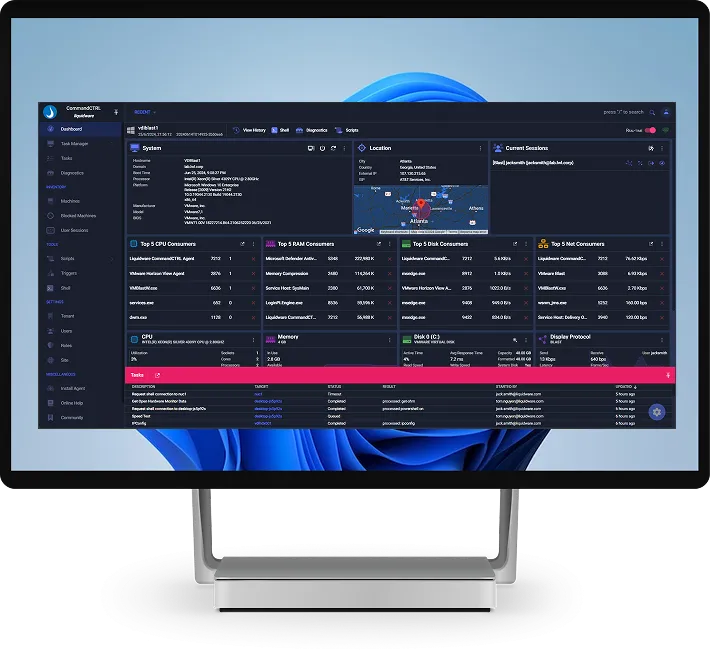
CommandCTRL delivers
-
Manage Windows, macOS and Linux workspaces regardless of location or platform
-
Eliminate infrastructure build-out cost and time
-
AI-enabled process identification for fast rogue-process detection
-
DVR playback to capture/rewind sessions for root-cause clarity
-
Remote command execution + scripts for complex incidents
SaaS Visibility Console
AI Process Insight
DVR Playback
Remote Command Execution
Script Library + Custom Scripts
Proactive DEX Optimization
5
Industry 1st Innovations
CommandCTRL by 

Real-time
Metrics
Every
3 Seconds
Connected workspace views
Remotely start, stop, or pause services
Gain visibility
Remediate any desktop, any user, anywhere
CommandCTRL
Rapid Remote Issue Remediation
Gain visibility and remediate any desktop, any user, anywhere—without requiring user interaction for common fixes.
CommandCTRL = Remediation depth
Gain visibility and remediate
-
Execute commands directly within user sessions
-
Use pre-built scripts or create custom scripts for advanced scenarios
-
Remotely start, stop, or pause services
-
Find root cause quickly with at-a-glance connected workspace views
Industry First Innovations in Real-Time Remediation!
Built for Azure Virtual Desktop and Windows 365
Support Cloud PCs & Session Hosts
- Real-time metrics every 3 seconds on AVD session hosts and Windows 365 Cloud PCs
- Fix issues remotely with commands and scripts—without taking control of the user’s session
- DVR-style replay to see exactly what happened and prove root cause
- Fully SaaS—no infrastructure to build or maintain
Hybrid & Migration Support
- Switch instantly between a user’s physical and cloud desktops
- Compare known-good user experiences side-by-side with Protocol Mirroring
- Support users through moves from legacy VDI such as Citrix and Omnissa desktops
- Elastic licensing that scales with your rollout
Works Across Physical, Virtual, and Cloud Workspaces

Platform Coverage
- Windows workspaces
- macOS workspaces
- Azure Virtual Desktop and Windows 365 Cloud PCs
- Physical PCs and legacy VDI such as Citrix and Omnissa desktops
What You Can See
- CPU, memory, disk, network, and session details
- Real-time monitoring + diagnostic tests
- Event log exports and AI-assisted process insight
Liquidware Value Calculator
No consultants, no waiting. The Liquidware Value Calculator quickly shows your potential savings, efficiency gains, and ROI in under 60 seconds.
CommandCTRL helped us pinpoint what happened, fix it remotely, and keep users productive.

Ready to Resolve Issues in Real Time?
Start your trial today.
Get the real-time visibility, diagnostics and remediation you need to support any desktop, any user, anywhere. CommandCTRL is part of Liquidware Essentials Plus, alongside ProfileUnity™, FlexApp™ and Stratusphere™ UX.
Only need real-time support on its own? Visit CommandCTRL.com for standalone CommandCTRL.
CommandCTRL is a SaaS solution focused on instant real-time insights and real-time remediation. DVR playback lets admins see issues exactly as they occurred, communication features support conversations with users, diagnostic tests are built in, and custom functions can be scripted. Monitor physical, virtual, and cloud workspaces through a single pane of glass.
Try risk-free: request 25 free licenses for qualified projects, access a free community edition for qualified users, or use a 15-day trial.
Request a free ROI assessment performed by Liquidware senior experts to support your decision.