
Try More Apps Than Ever with the FlexApp One Trial
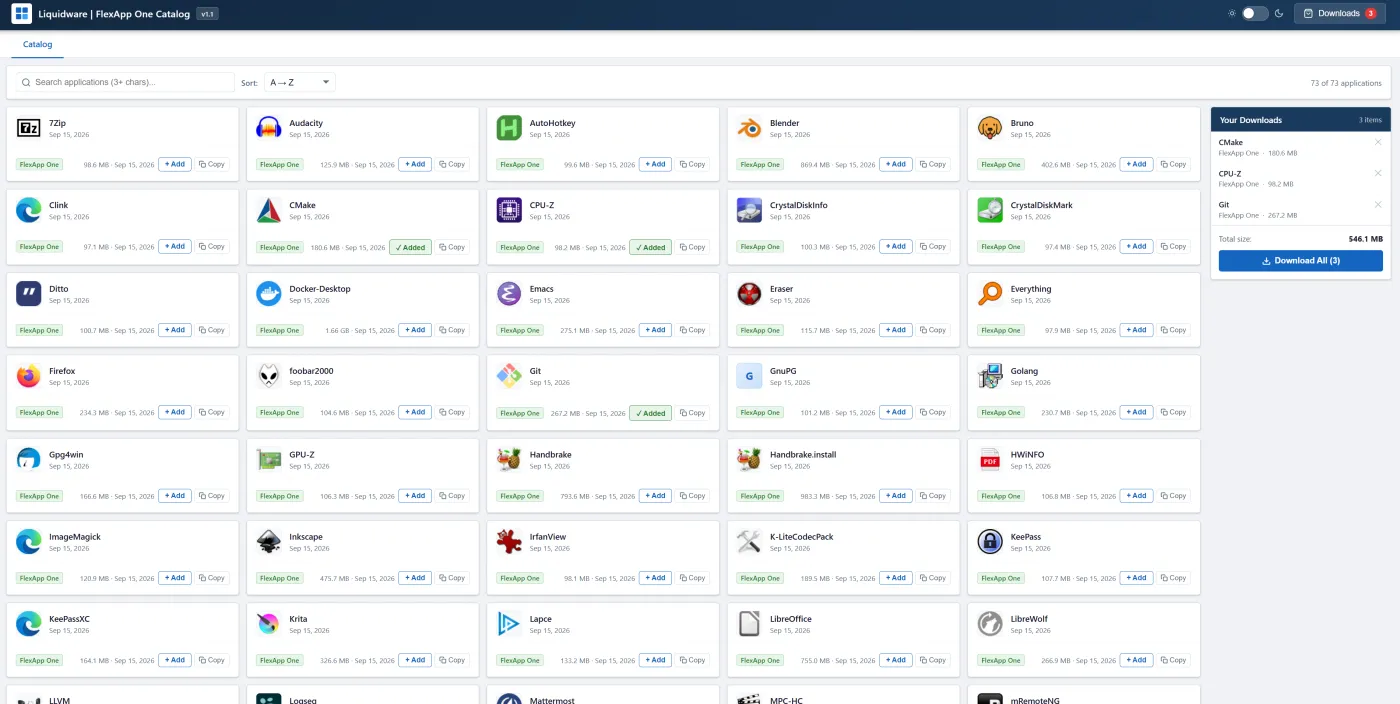
The FlexApp One trial now includes 72 ready-to-run applications, a big jump from where the library started. That means you can test FlexApp One against the kinds of apps your users actually run, not just a demo or two.
When we first launched the FlexApp One trial, the pitch was simple: try it over a cup of coffee. Download a package, double-click it, and watch an application run on a Windows PC without installing it. No servers, no console, no training. That pitch hasn't changed. What has changed is how much you can try while the coffee is still hot.
The natural question after any trial is some version of "Great, but does it work with our stuff?" With this expanded library, there's a much better chance the answer is sitting right there for you to test yourself.
What FlexApp One is, and how the trial works
FlexApp One is a feature of FlexApp, our Modern App Delivery technology. A FlexApp One package is a self-contained application container that runs on a virtual or physical Windows PC with no extra infrastructure and no management console. You hand someone a file, they double-click it, and the app runs.
The trial keeps it to three steps:
- Register. Fill out a short form to unlock the FlexApp One library.
- Pick your apps. Browse the catalog, add one or more apps to your downloads, and grab the zip files.
- Double-click and run. Open the zip, then double-click the FlexApp One package inside it.
What's in the library now
The catalog spans office suites, creative tools, developer stacks, IT utilities and security apps, so nearly every team in your organization has something to test. You can sort it alphabetically or by newest, add as many apps as you like to your download list, and pull them all down at once.
| Category | Apps you can try |
|---|---|
| Office and productivity | LibreOffice, OpenOffice, ONLYOFFICE, Thunderbird, Logseq, Ditto, Everything, AutoHotkey, ShareX |
| Browsers and communication | Firefox, LibreWolf, Mattermost, Telegram |
| Creative and media | Blender, Krita, Inkscape, RawTherapee, ImageMagick, IrfanView, XnView, nomacs, Audacity, OBS Studio, HandBrake, VLC, MPC-HC, K-Lite Codec Pack, foobar2000, Picard |
| Developer tools | Git, TortoiseGit, Node.js, Go, Ruby, LLVM, CMake, Vim, Neovim, Emacs, Lapce, Bruno, WinMerge, Clink |
| Containers and virtualization | Docker Desktop, Rancher Desktop, Vagrant, VirtualBox |
| IT admin and diagnostics | PuTTY, mRemoteNG, TightVNC, Nmap, Wireshark, CPU-Z, GPU-Z, HWiNFO, CrystalDiskInfo, CrystalDiskMark, WinDirStat, WizTree, Revo Uninstaller, Rainmeter |
| Security and privacy | KeePass, KeePassXC, VeraCrypt, Eraser, GnuPG, Gpg4win, OpenVPN, WireGuard |
| Files and compression | 7-Zip, PeaZip, qBittorrent |
Every app in the library is free or open source, and that's by design. It lets us offer a public trial anyone can run, with no licensing hoops to clear first.
But the library isn't the limit. FlexApp delivers the industry's highest application compatibility and can run nearly any Windows application from a VHDX container. That includes the large, specialized software organizations rely on most such as: Epic Hyperdrive in healthcare; Autodesk AutoCAD, Revit, Civil 3D and Inventor; SolidWorks, Bentley MicroStation and Esri ArcGIS Pro for engineering and GIS; Adobe Creative Cloud for design teams; SAP GUI for finance and operations; and the in-house line-of-business apps nobody else has ever heard of. If you can think of it, FlexApp can very likely run it.
The trial gives you a feel for that. Watching Docker Desktop, VirtualBox or Blender launch from a double-click tells you far more than a calculator demo ever could.
Why it's worth 15 minutes of your time
A bigger library turns the trial from a quick demo into a real proof point. Here's what you can learn in one sitting:
- It works with apps like yours. Test the categories your users depend on, from developer toolchains to media editors, instead of taking our word for it.
- There's nothing to stand up. No servers, no console, no packaging project before you see results. One PC and a few double-clicks.
- The model is easy to explain. Once you've run a few packages, it's easy to picture how this simplifies delivery for remote workers, contractors, labs, or anyone on a physical or virtual desktop.
- It's a starting point, not the finish line. When you're ready to package your own applications, you can use the FlexApp Packaging Console under a trial license, or download a fully functional 15-day evaluation of FlexApp with the ProfileUnity console.
Grab a coffee and give it a try
The fastest way to understand FlexApp One is to run it yourself. Register, pick a few apps from the library, and see how far a double-click can take you.
Sign up for the FlexApp One trial
If you'd like to talk through how FlexApp One fits your environment, our team is happy to set up a call. And if there's an app you'd like to see in the library next, let us know.