
Enhance or Replace FSLogix with ProfileUnity™
FSLogix profile containers make logons fast. ProfileUnity™ adds what containers alone don’t provide: profile backup and fast recovery, portability across platforms and Windows versions, and full policy management. Run it alongside FSLogix, or use ProfileUnity ProfileDisk in its place, across Azure Virtual Desktop (AVD), Windows 365, physical PCs and legacy VDI such as Citrix and Omnissa desktops.
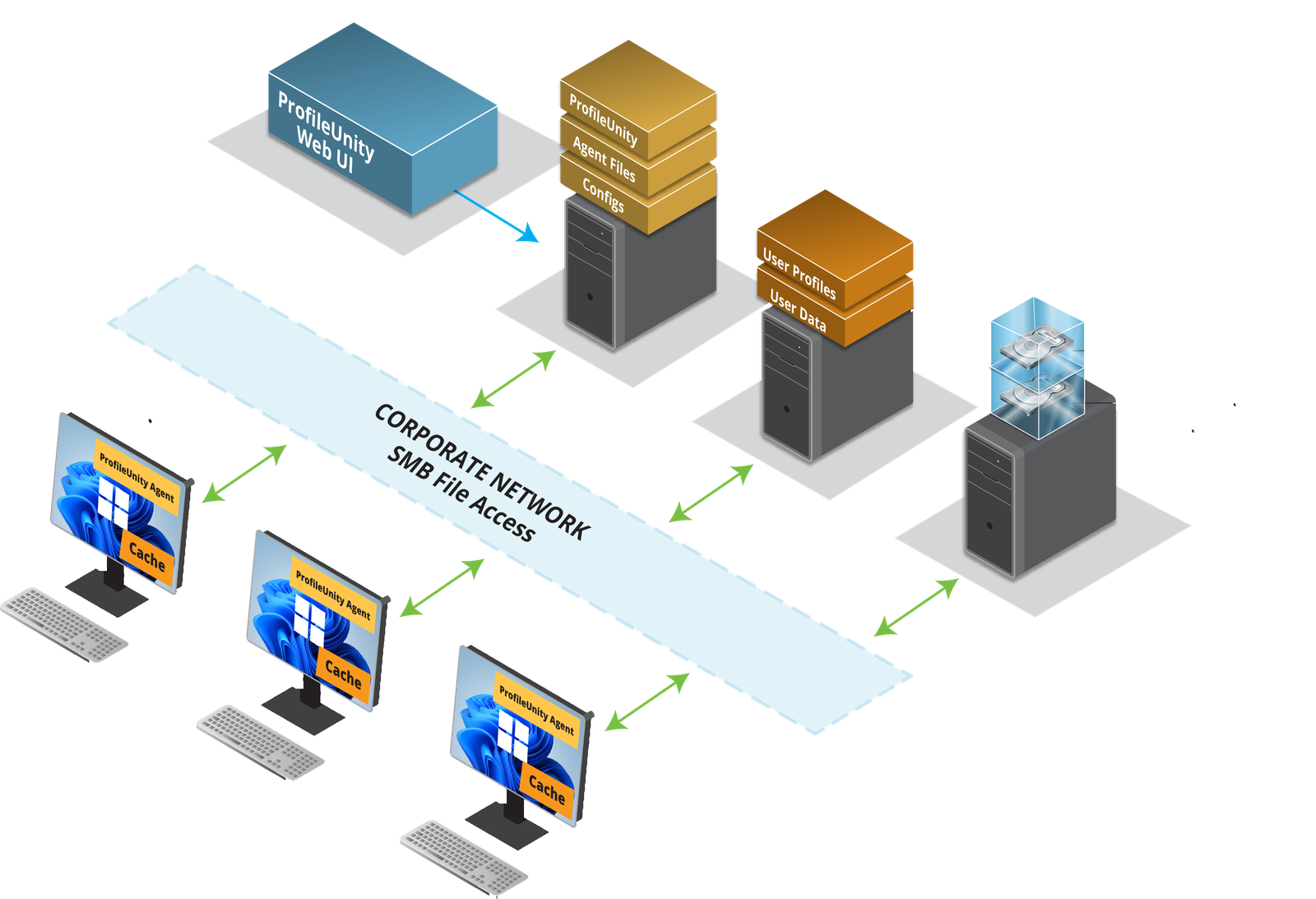
Trusted by 1,000+ organizations worldwide. Works alongside FSLogix or replaces it. Supports AD and Microsoft Entra ID, with no required SaaS and support for air-gapped networks.
Where FSLogix Profile Containers Need More
FSLogix was built to move a profile quickly, as one virtual disk mounted at logon, and it does that well. Backup, recovery, policy and portability were never its job. That leaves IT teams filling the gaps with scripts, extra storage and rebuilt profiles. ProfileUnity fills those gaps, whether you keep FSLogix or replace it.
FSLogix vs. FSLogix + ProfileUnity vs. ProfileUnity with ProfileDisk
| Capability | FSLogix alone | FSLogix + ProfileUnity | ProfileUnity with ProfileDisk |
|---|---|---|---|
| Fast, container-based logon | ✓ | ✓ | ✓ |
| Send specific parts of a profile to VHDX storage | Limited: policy covers Microsoft 365 data only; other folders need command-line tools and rules | ✓ | ✓ |
| Profile backup and point-in-time restore | No | ✓ | ✓ |
| Fast recovery of corrupt profiles | No, delete and rebuild | ✓ | ✓ |
| Disaster recovery without Cloud Cache | No | ✓ | ✓ |
| Laptops and offline use | Best when always connected | ✓ | ✓ |
| Move profiles between Windows 10, Windows 11 and Server | Limited | ✓ | ✓ |
| Move profiles between legacy VDI, AVD, Windows 365 and physical PCs | Limited | ✓ | ✓ |
| Context-aware policy by user, group, device or location | No | ✓ | ✓ |
| Policy applied at login or any trigger point | No | ✓ | ✓ |
| AD and Microsoft Entra ID | ✓ | ✓ | ✓ |
FSLogix Alternative FAQ
What is the best alternative to FSLogix?
ProfileUnity™ is a complete FSLogix alternative. Its ProfileDisk technology delivers container-style logon performance and can send specific parts of a profile to VHDX storage. ProfileUnity also adds backup, recovery, portability, offline support and full policy management.
Do I have to replace FSLogix to use ProfileUnity?
No. ProfileUnity runs alongside FSLogix profile containers and adds backup, recovery, portability and context-aware policy. You can keep FSLogix, or replace it with ProfileDisk when you’re ready.
How do I fix a corrupt FSLogix profile?
Delete the corrupt FSLogix profile and have the user log back on. ProfileUnity instantly rehydrates the profile from its Profile Portability storage with the user’s last known good profile, so the user stays productive and nobody rebuilds anything by hand.
Are ProfileUnity profiles prone to corruption like FSLogix profiles?
Not with Profile Portability. ProfileUnity’s portability settings don’t rely on Microsoft’s NTUSER.DAT file, the number one cause of profile corruption. Any virtual disk can still be corrupted, whether it’s an FSLogix container or ProfileUnity ProfileDisk. When that happens, Profile Portability restores the user’s last known good profile at their next logon, so they’re back to work in minutes.
Can admins roll back a user’s profile?
Yes. With ProfileUnity, admins can restore a user’s profile to a previous point in time in minutes, whether FSLogix or ProfileDisk holds it.
Does FSLogix work for laptops and offline users?
FSLogix is designed for always-connected virtual desktops. ProfileUnity fully supports laptops and offline use, so users keep their settings when they disconnect.
Does FSLogix include backup or disaster recovery?
FSLogix offers Cloud Cache, which replicates containers to more than one storage location. It doesn’t include point-in-time backup, and Microsoft notes that Cloud Cache is I/O intensive and failover is manual. ProfileUnity adds backup and recovery with or without Cloud Cache.
Can I move profiles between Windows 10 and Windows 11, or between platforms?
Yes. ProfileUnity moves user settings between Windows versions and between legacy VDI, AVD, Windows 365 and physical PCs, and leaves OS-specific conflicts behind.
Does ProfileUnity work with AVD, Windows 365 and Microsoft Entra ID?
Yes. ProfileUnity supports AVD, Windows 365, physical Windows and legacy VDI, with both AD and Microsoft Entra ID.
Common FSLogix Pain Points
-
Corrupt containers often mean deleting the profile and starting the user over
-
No built-in point-in-time backup or restore of profile containers
-
Disaster recovery depends on Cloud Cache, extra storage in two locations and manual failover
-
Exclusive container locks can block sign-ins until admins close file handles
-
Dynamic disks grow until a full container fails to attach and users get a temporary profile
-
The whole profile moves as one disk, carrying OS conflicts between Windows versions and platforms
-
No context-aware policy by user, group, device or location
What ProfileUnity Delivers
“One of our core values is to 'simplify IT management' and ProfileUnity fits perfectly with that.”
- Martijn Konings, Senior System and Network Administrator
Two Paths: Enhance FSLogix or Replace It
Keep FSLogix. Add ProfileUnity.
Keep your FSLogix profile containers and the fast logons they give you. ProfileUnity runs alongside them and adds profile backup and fast recovery, business continuity and disaster recovery (BCDR) without depending on Cloud Cache, seamless moves between platforms and Windows versions, and context-aware policy by user, group, device or location.
Better together. Nothing to rip out.
Or Replace FSLogix with ProfileUnity ProfileDisk
ProfileDisk is ProfileUnity’s own virtual disk technology. It delivers the container-style performance you expect from FSLogix and is more efficient. It can also send specific parts of a profile to VHDX storage, so only the data that benefits from a disk goes on one. Everything else stays portable and under policy control. Profile Portability doesn’t rely on NTUSER.DAT, the number one cause of profile corruption. If a disk is ever damaged, it restores the user’s last known good profile at their next logon.
One user management solution instead of two.
Meet ProfileUnity
ProfileUnity is Liquidware’s user environment management solution. It manages the whole user profile, including backup, recovery, portability and policy, across physical PCs, AVD, Windows 365 and legacy VDI. Pair it with FSLogix profile containers or with ProfileUnity ProfileDisk. Either way, nothing else in the industry matches its portability and full policy management. Learn more about ProfileUnity.
Profile Backup & Fast Recovery
-
Automatic, point-in-time backup of user profiles.
-
Admins can roll back any user’s profile to a previous point in time, for corruption, a bad app install or a broken setting.
-
Business continuity and disaster recovery without depending on Cloud Cache.
-
Users keep their settings, and IT stops rebuilding profiles.
ProfileDisk with Selective VHDX Storage
-
Container-style logon performance, used with or instead of FSLogix.
-
Send only the parts of a profile that need a disk, such as Outlook, Teams and search data, to VHDX storage.
-
Smaller disks, so fewer containers lock or fill up.
-
Pair with Stratusphere™ UX to see a full Windows login breakdown.
Cross-Platform & Cross-OS Portability
-
Move users between legacy VDI, AVD, Windows 365 and physical PCs.
-
Migrate from Windows 10 to Windows 11 with settings intact.
-
Leave OS-specific conflicts behind instead of carrying them in a container.
-
Migrate from Citrix Profile Management, Omnissa DEM, roaming profiles or FSLogix.
Context-Aware Policy Management
-
Apply drive maps, printers, application settings and security policy by user, group, device or location.
-
Policy applies at login or the moment a trigger point fires, not at the next sync.
-
Supports Entra ID-joined, hybrid-joined and AD domain-joined devices.
-
Complements Intune and FSLogix. No required SaaS, and air-gapped networks are supported.
FSLogix Enhancement That Checks Every Box
FSLogix Was Built to Move Profiles.
ProfileUnity Is Built to Manage Them.
FSLogix is ideal for always-connected virtual desktops. Today’s users also work on laptops, go offline, move between AVD, Windows 365 and physical PCs, and upgrade from Windows 10 to Windows 11. ProfileUnity fully supports laptops and offline use, backs up and recovers profiles, and applies policy wherever the user works, with FSLogix or without it.
Stop rebuilding profiles. Start managing them.
One console. Every user. Any Windows desktop.
See What Organizations Achieve with ProfileUnity

Trusted by enterprise organizations worldwide.
See ProfileUnity in Action
Get the ProfileUnity Whitepaper
Why IT Teams Choose Liquidware
One Solution. Every Environment.
ProfileUnity is platform-agnostic by design — works across physical PCs, AVD, Windows 365 and legacy VDI such as Citrix and Omnissa desktops, with Entra ID or Active Directory. One policy console instead of separate scripts for each platform.
Enterprise Scale. Proven Results.
Trusted by 1,000+ enterprises worldwide. Customers save an average of $250 per user annually and reduce workspace management costs by 30%. 91% report noticeable OPEX savings. 99% support satisfaction rate.
Simpler IT. Happier Users.
Profiles that recover in minutes instead of being rebuilt, settings that follow users across platforms and Windows versions, and full support for laptops and offline use. Fewer tickets. Happier users.
All designed to reduce complexity and keep users productive through change.
What's Better Profile Management Worth?
Liquidware Value Calculator
No consultants. No waiting on someone to run the numbers. The Liquidware Value Calculator delivers a snapshot of your potential savings, efficiency gains, and ROI in under 60 seconds.