
See it. Fix it. Prove it.

It’s quiet on the service desk in the early morning of 2012 and on the walls are big TV screens showing green squares representing the different services IT was monitoring. But then the phone started ringing and reports of slow logons and hanging applications started flooding in. IT was stumped as to what this was, as the monitors were still showing all green lights. Back then we were monitoring systems, whereas we should have been measuring the end user’s experience. Fast forward to today and I still see many companies not aware of what is happening in their organizations - what things need attention right now, what is the correlation and how money can be saved in the end. This is why we need this to be better. We need to See It. Fix. Prove it.
Because measuring hardware or the status of service, doesn’t tell the whole story. And this is where IT and have historically always clashed. The employee has a bad experience and the IT admin cannot find anything in the logs so it must be nothing. However, oftentimes this experience isn’t based on feelings, they are actual moments of interference that interrupt that employee’s day and therefore their productivity.
See it.
This is why we need to gather tremendous amounts of data to be able to know of all of these tiny nuances. CPU, Memory and Disk metrics aren’t enough! We want to know about every hop on the network and even to how far away our employees’ laptops are from the access point at home. Even when technology changes, we need to keep up on all of these metrics: the Neural Processing Units for example that take on AI workloads. Stratusphere UX has been there to collect all of these metrics and has been kept up with a robust base that started our Company in 2009. What has changed is the way that we present this. Those deep metrics are still available, as we need it to dive deep into the issues we want to resolve. But what the DEX (Digital Employee eXperience) movement has brought gives direct insights over the whole of the organization. 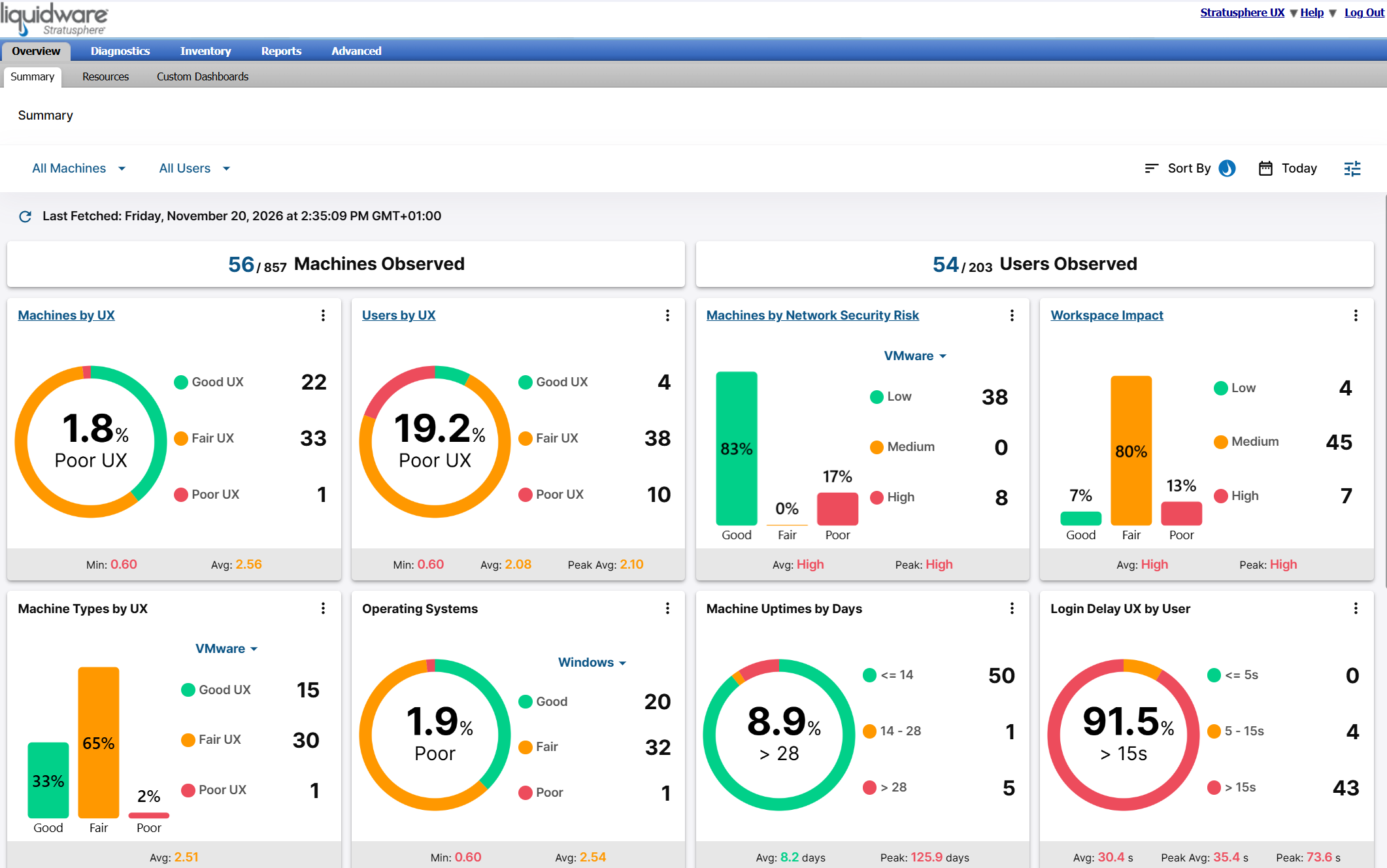
We know a lot about the user's session, no matter the platform they are on. On Windows365, AVD, Citrix, Omnissa Horizon or on your physical devices, employees expect to have a session that logs on swiftly, doesn’t crash and where applications are constantly responding.
Stratusphere UX uses all of these metrics to create a score of how well that experience is. This means we can immediately see which employees’ endpoints require our attention. This goes for the devices they are using as well, making it very easy to view which VM might need resizing or which laptop has ran its course and needs replacing.
What I love about StratusphereUX is how you start at a high level, identify an issue and keep peeling back the onion to investigate what is going on. Was the user experience poor because of the boot time? Let’s dissect every action that was taken from the moment the machine was booted up until the user was logged on. And if going over 300 lines of logs isn’t your idea of a fun afternoon, you can use our AI Assistant plugin to parse the data for you and give clear results.
Fix it
Now that we have identified that there’s an issue, we need to start the remediation. With a single click of a button we transport from the hourly insights of StratusphereUX into the live view of CommandCTRL. Here we see all major metrics updated in realtime and view what is happening right now - but there’s so much more! Employees hate to stand to the side while IT collects logs and runs tests from their PC, so what if we could do that better? The IT administrator can use CommandCTRL to collect specific- and event logs, run speedtests, pings and other actions directly from the endpoint. Should that not be enough, a remote Powershell in either the user’s- or the system context to investigate and take actions: all without ever bothering the employee! And when remediation is repeated, why not put it in a script which CommandCTRL can run on the endpoint? But when we do require the employee’s interaction or if they need our support, CommandCTRL supports full remote support so the IT admin can view and control the employees machine - fixing the issue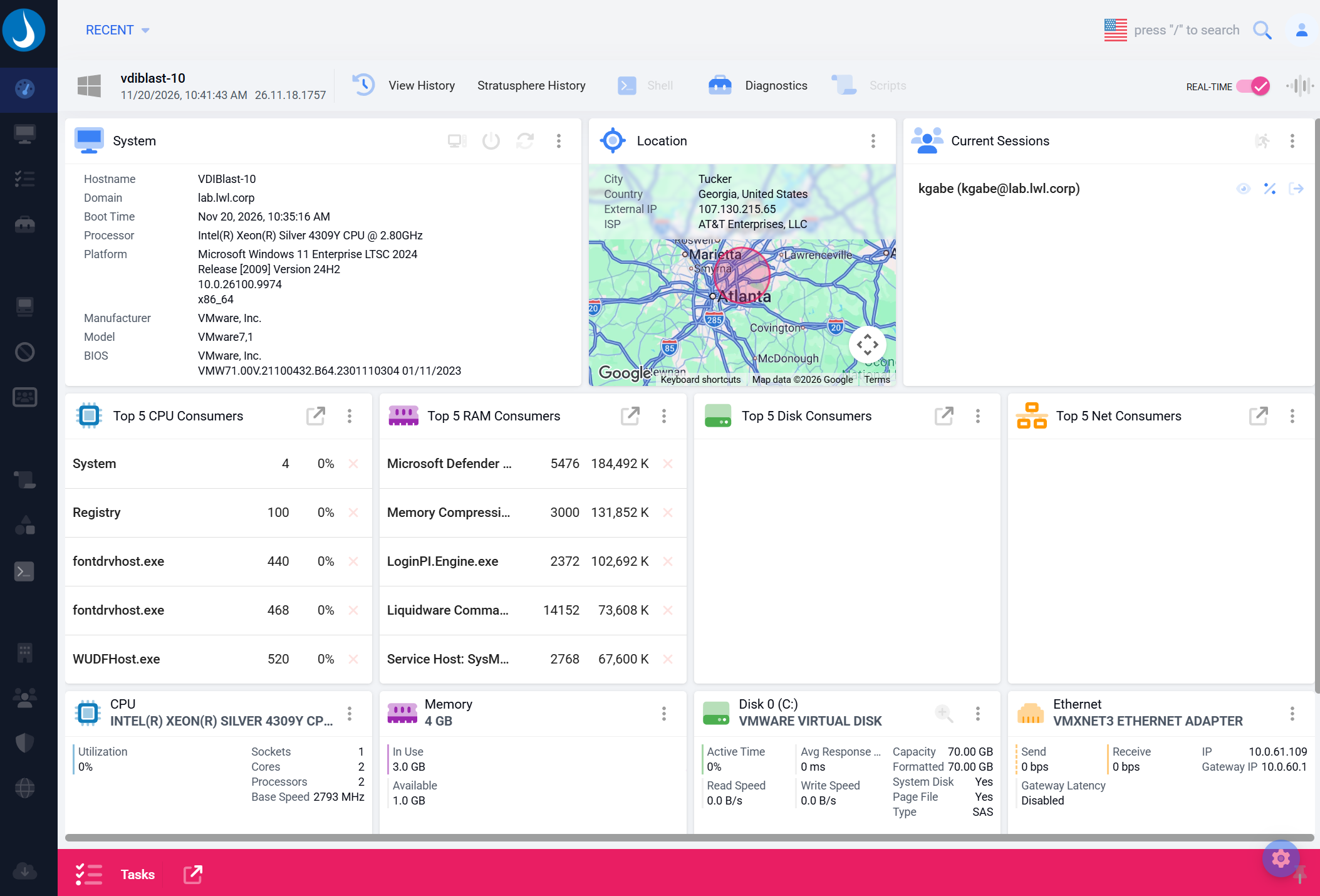
When the issue isn’t something that is occurring now, CommandCTRL’s Ace up the sleeve is the history view. Switch to a specific data and time range and you can see the metrics behaving as they were at that point in time. Giving the IT admin insights into what was really going on when the employee was experiencing that issue.
As stats can be overwhelming, CommandCTRL allows for the use of your own AI to come save the day. AI Insights looks at a snapshot in time (either now, or in the past) of all the metrics and hardware info and sends this - fully anonymized - to ChatGPT, Claude, xAI and AzureOpenAI. This will return an overview with a traffic light system of items that are going well or could be better - along with explanations as to why this is and what the next step is. Being an AI model, it understands natural, conversational language so ask away and work together to find and fix the issue.
Prove it
Insights, monitoring and remediation is important to keep every cog in the IT machine turning but we also need to prove its worth. Often management decisions require raw data and this is exactly where Stratusphere UX can assist. Measuring the before and after of your organization is the quickest way, showing an increase in employees with a great experience. But also more tangible things like fewer Service Desk tickets, as issues can be seen and remediated before the issue is noticed. Quick fixes and resolutions will also greatly benefit the value proposition.
But what the C-suite loves even more is cost reductions and you can utilize Stratusphere UX to rightsize your virtual machine environment to do this. Start by finding the actual consumption of resources used in these VM’s and create t-shirt sizes (small, medium, xl) dependent on the workload. Then size accordingly. Our lovely receptionist most likely doesn’t need a 16GB Windows365 desktop, whereas a finance employee can run into limitations opening large spreadsheets. Scaling accordingly in both physical hardware as cloud environments can greatly reduce spending.
But there are so many other ways to prove value, so let's dive into one more. When IT makes an app available, most people will gladly take it on board. But how many of those are still using it after three weeks?
Software licenses can be a big hidden cost because the departments using the software are often not the ones purchasing it. This helps organizations to reduce the amount of applications and the associated licensing costs. This makes it a very relevant capability to drive IT budget cost savings, leaving more budget for IT & business initiatives that actually need it.
Want to learn more on how Liquidware can help organizations See It, Fix it and Prove it? Request to speak to one of our EUC experts.