
SOLUTION: AVD AUTOSCALING & BURSTING
AVD Autoscaling That Proves Its Savings.
Capacity When Users Need It. Gone When They Don’t.
FleetCTRL™ scales Azure Virtual Desktop (AVD) host pools to real workday demand and bursts on demand, without paying for idle, pre-provisioned hosts. Every dollar saved shows up in the cost dashboard, every scaling action is audited, and it all runs in your own Azure tenant.
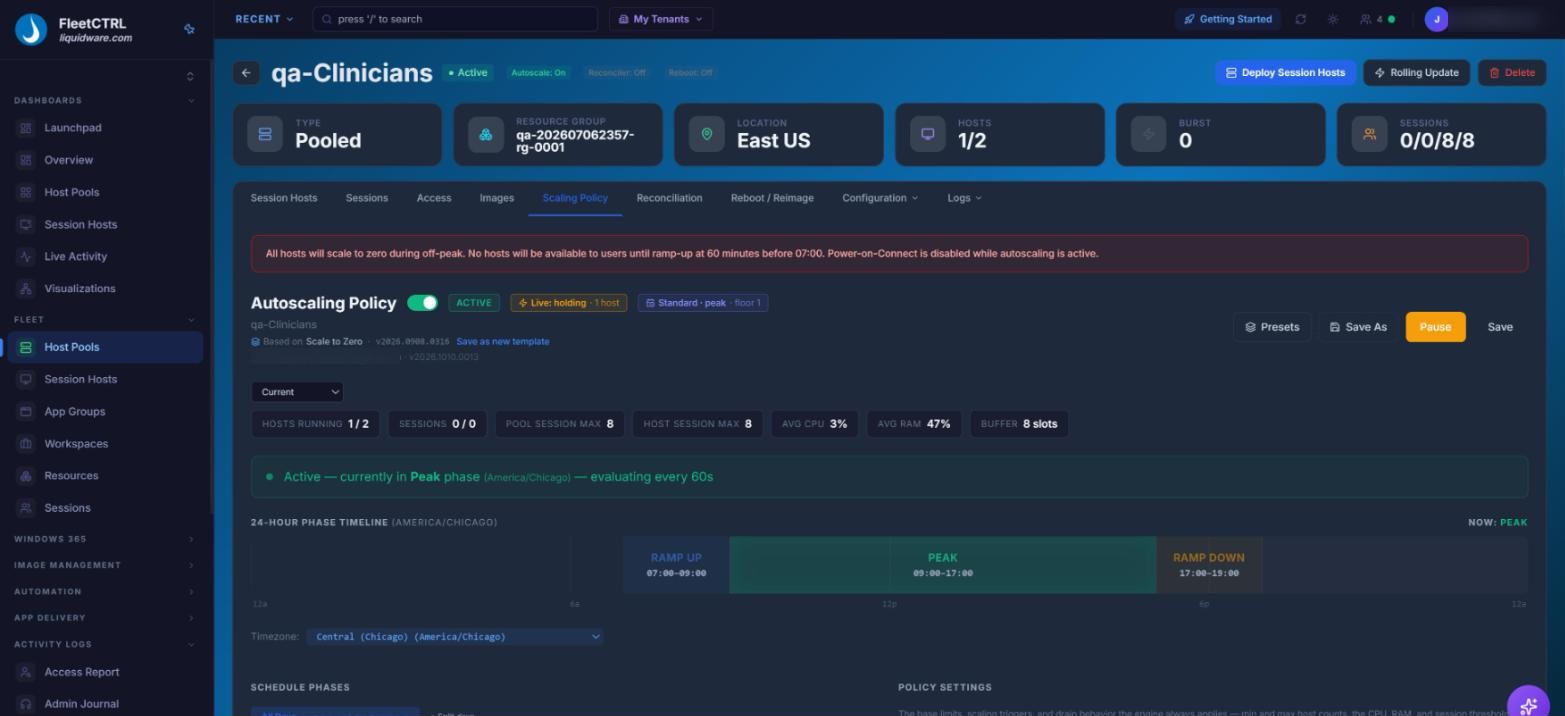
An autoscaling policy and its daily phase timeline for an AVD host pool, in a single FleetCTRL view.
Idle Hosts Shouldn’t Be
the Biggest Line on Your Azure Bill
Most AVD host pools are sized for the busiest hour of the busiest day, then left running overnight and through the weekend. Scaling plans get tuned pool by pool and slowly drift apart. And when Finance asks what autoscaling actually saved, nobody has a clear answer.
Azure Virtual Desktop’s native autoscale is a strong foundation, starting and stopping session hosts against schedules and capacity thresholds. FleetCTRL completes it with on-demand bursting, savings you can see, healthy hosts and a full audit trail, operated across every pool from one console.
What FleetCTRL adds to AVD autoscaling:
Scale to the Workday
Pools scale out and in on session, CPU and RAM triggers, so capacity follows real demand instead of a worst-case guess.
Burst Without Idle Hosts
On-demand burst capacity appears when users need it and goes away when they don’t, with no idle, pre-provisioned hosts to pay for.
Prove the Savings
The cost dashboard shows savings from the first scaling action, with per-user cost attribution and forecasting Finance can trust.
FleetCTRL: Autoscaling that shows its savings and keeps every host healthy.
Scaling Built for Real Workdays
-
Set scaling once as policy and apply it across pools from one console. Session, CPU and RAM triggers drive every scale-out and scale-in, every scaling action is logged, and Scaling and Threshold Advisors recommend your next move.
On-Demand Bursting
-
When demand spikes, burst capacity comes online for the users who need it, then goes away when they don’t. You stop paying for idle, pre-provisioned hosts that sit waiting for a busy morning. [[Jason: confirm how bursting creates and removes hosts, and from which image]]
Savings You Can Prove
-
A two-tier cost engine, per-user cost attribution and forecasting show what scaling saved, starting from the first scaling action. Reserved-instance recommendations and disk-tier switching find savings beyond scaling, so the numbers come from the cost dashboard, not a spreadsheet.
Healthy as It Scales
-
Autoscaling works alongside drift detection and self-healing hosts. Self-healing escalates step by step, from an agent restart up to rebuilding the host from its image, so hosts stay correct as pools grow and shrink.
Scaling and Image Rollouts Work Together
-
Temporary testing-copy pools are excluded from autoscaling and hidden from production dashboards, so tests never distort capacity or cost. After a one-click image Rollback, autoscaling resumes on its own. See how image management works
Guardrails and Audit, in Your Tenant
-
Role-based access, approved regions, images and hardware, and validation before automation runs keep scaling inside your rules. Admins can preview scaling policy outcomes before they take effect. Every scaling action lands in a tamper-protected FleetCTRL audit log naming the admin and role behind it, mirrored to your Azure Activity Log and exportable as JSON for your SIEM.
Coming From Citrix Autoscale? It’ll Feel Familiar, Only Easier.
If you’ve tuned Citrix Autoscale, the ideas behind FleetCTRL will feel familiar: capacity that follows demand, users kept on healthy machines, and cost kept under control. The difference is that FleetCTRL runs natively on Azure Virtual Desktop, in your own Azure tenant.
What gets easier: there’s less to stand up, scaling policies apply across pools from one console, and the savings show up in the cost dashboard instead of a report you build yourself. It’s the fastest way for teams on legacy VDI such as Citrix and Omnissa desktops to get confident with AVD.
What Changes With FleetCTRL
| Area | With FleetCTRL | Scaling by Hand |
| Scaling | Session, CPU and RAM triggers, set as policy and applied across pools from one console | Scaling plans tuned pool by pool |
| Peak demand | On-demand burst capacity, with no idle, pre-provisioned hosts | Pools sized for the busiest hour and left running |
| Savings | Cost dashboard from the first scaling action, with per-user cost attribution and forecasting | Estimates pieced together from the Azure bill |
| Beyond scaling | Reserved-instance recommendations and disk-tier switching | Reviewed by hand, when there’s time |
| Host health | Drift detection and self-healing, from an agent restart up to rebuilding the host from its image | Problems found when users complain |
| Image rollouts | Testing copies excluded from autoscaling; autoscaling resumes on its own after a rollback | Scaling paused and restarted by hand |
| Guardrails | Role-based access, approved regions, images and hardware, validation before automation runs, and a preview of scaling policy outcomes | Portal permissions and manual checks |
| Audit | Every scaling action logged with the admin and role behind it, mirrored to the Azure Activity Log and exportable as JSON | Azure Activity Log alone |
| Exit path | Release pools back to native Azure management | — |
Native AVD Autoscale and FleetCTRL, Better Together
Microsoft provides a solid scaling engine. FleetCTRL completes it with bursting, visible savings, self-healing, guardrails, audit and one console across every pool.
| Capability | Native AVD Autoscale: Pooled | Native AVD Autoscale: Personal | What FleetCTRL Adds |
| Start and stop session hosts | Scaling plans start and stop hosts against schedules and capacity thresholds (generally available) | Hosts start on a schedule or on connect, and are deallocated on sign-out or disconnect | Session, CPU and RAM triggers, set as policy across pools from one console |
| Create and remove session hosts | Dynamic autoscaling, in preview, for pooled host pools with session host configuration | Not part of native personal pool autoscale | On-demand bursting, with no idle, pre-provisioned hosts [[Jason: confirm mechanics]] |
| Proving savings | Outside the scope of autoscale | Outside the scope of autoscale | Cost dashboard with per-user attribution, forecasting, reserved-instance recommendations and disk-tier switching |
| Host health | Outside the scope of autoscale | Outside the scope of autoscale | Drift detection and self-healing, from an agent restart up to rebuilding the host from its image |
| Guardrails | Azure role-based access | Azure role-based access | Approved regions, images and hardware, validation before automation runs, and a preview of scaling policy outcomes |
| Audit | Azure Activity Log | Azure Activity Log | A tamper-protected FleetCTRL audit log naming the admin and role, mirrored to the Azure Activity Log and exportable as JSON |
Native autoscale details reflect Microsoft Learn documentation as of November 2026. [[Jason: confirm which host pool types FleetCTRL autoscaling supports, pooled, personal or both, and whether hibernate is supported]]
Runs where you need it. FleetCTRL runs in your own Azure tenant, or on-premises on your own servers connected to your Azure tenant. It isn’t a vendor-hosted service, it supports Azure Government (GCC High) and DoD environments, and pools can be released back to native Azure management whenever you choose. Standard & 24×7 support options are available.
Better with the full suite. Pair FleetCTRL with Liquidware Essentials: Stratusphere™ UX right-sizes hosts and validates the user experience, ProfileUnity™ keeps profiles portable as hosts come and go and works alongside FSLogix or supersedes it with ProfileDisk, and FlexApp™ delivers applications dynamically, so images stay lean.
Windows 365: FleetCTRL also manages Windows 365 Cloud PCs from the same console. Autoscaling, bursting and the savings described here apply to AVD host pools.
Microsoft, Azure and Windows 365 are trademarks of the Microsoft group of companies. Citrix is a trademark of its respective owner. FleetCTRL is in preview; capabilities described reflect the preview release and may change.
AVD Autoscaling: Frequently Asked Questions
Does FleetCTRL replace Azure Virtual Desktop autoscale?
No. It completes it. AVD’s native autoscale starts and stops session hosts against schedules and capacity thresholds. FleetCTRL adds on-demand bursting, savings you can see in its cost dashboard, self-healing hosts, guardrails and an audit trail, and runs scaling across every pool from one console. [[Jason: confirm whether FleetCTRL drives native scaling plans or its own scaling engine]]
What triggers scaling?
Pools scale out and in on session, CPU and RAM triggers, and every scaling action is logged. Admins can preview scaling policy outcomes before they take effect. [[Jason: confirm any other triggers, such as schedules or predictive scaling]]
Does it work with pooled and personal host pools?
[[Jason: confirm supported pool types and hibernate support]]
How are users protected when hosts scale in?
[[Jason: confirm scale-in behavior, including draining, session consolidation and sign-out handling]]
How do I know what autoscaling saved?
The cost dashboard shows savings from the first scaling action. A two-tier cost engine adds per-user cost attribution and forecasting, plus reserved-instance recommendations and disk-tier switching.
Does autoscaling apply to Windows 365?
No. Autoscaling, bursting and the savings on this page apply to AVD host pools. FleetCTRL also manages Windows 365 Cloud PCs from the same console.
Where does FleetCTRL run?
In your own Azure tenant, or on-premises on your own servers connected to your Azure tenant. FleetCTRL is not a vendor-hosted service. Azure Government (GCC High) and DoD environments are supported.
Is it available now?
FleetCTRL is announced. The preview opens in Q1 2027 by application, subject to approval, and general availability is planned for 2027.
Ready to Stop Paying
for Idle Hosts?
The FleetCTRL preview opens in Q1 2027.
Apply now to be first in line.