
SOLUTION: APP STRATEGY FOR AVD & WINDOWS 365
Every App, Delivered and Orchestrated.
Modern App Delivery for AVD and Windows 365, Whatever Packaged It.
FleetCTRL™ orchestrates app delivery to Azure Virtual Desktop (AVD) host pools from one console. FlexApp™, MSIX, App-V and partner packages go through App Attach, and FlexApp One packages are delivered directly. Stratusphere™ UX shows which apps to bring, and FlexApp delivers them to Windows 365 Cloud PCs too.
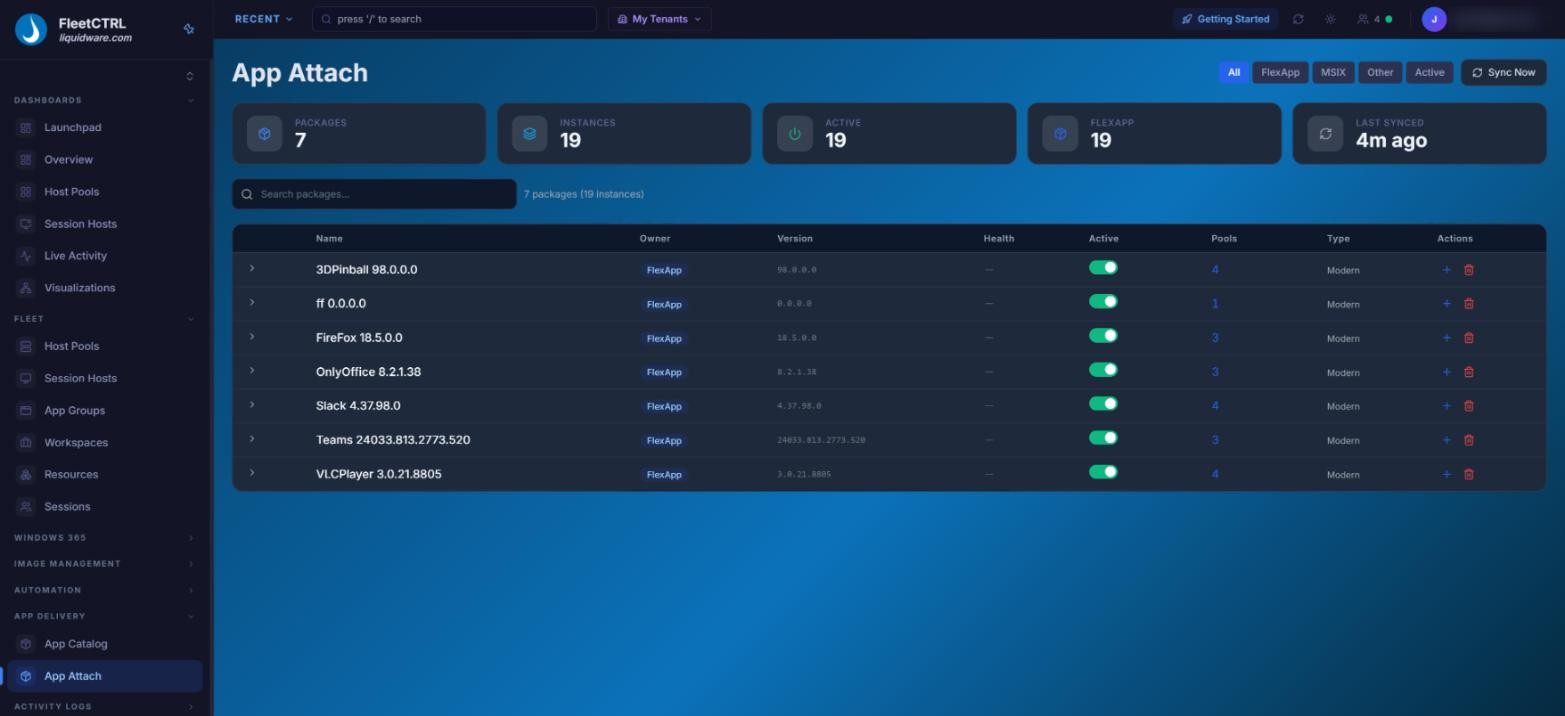
FlexApp packages assigned to AVD host pools through App Attach, tracked in one FleetCTRL view.
Moving to AVD Shouldn’t Mean
Starting Your Apps Over
Most organizations arrive at AVD and Windows 365 with years of application work behind them: hundreds of apps packaged with Omnissa App Volumes, Numecent/Citrix Cloudpager, App-V or MSIX, plus the ones still installed in golden images. Rebuilding all of it before the move delays the project, and baking apps into images makes every update harder.
Microsoft App-V is in maintenance mode, and Microsoft recommends moving to App Attach and MSIX. You need a path forward that doesn’t throw away what already works.
A modern app strategy comes down to three steps:

1. Assess
Stratusphere UX shows which applications are actually in use in your legacy environment, and how often, so you bring the right apps forward and retire the rest.

2. Package
FlexApp packages each app once, with no image changes. FlexApp One packages are self-contained and work independently of App Attach, so FleetCTRL delivers them directly, or Microsoft Intune can.
3. Orchestrate
FleetCTRL assigns FlexApp, MSIX, App-V and partner packages to AVD host pools through App Attach, delivers FlexApp One packages directly, and tracks every instance in one view. Apps that belong in the base image get the same care through FleetCTRL image management.
FleetCTRL: One console for every app format and App Attach partner.
FlexApp, Recommended
-
FlexApp delivers apps on demand with no image modifications and no platform lock-in, and complements Microsoft Intune and App Attach. It’s the leanest path to AVD and Windows 365.
Keep Your App Volumes Investment
-
Omnissa App Volumes is an approved App Attach partner. FleetCTRL delivers those packages to AVD host pools alongside everything else, so you don’t have to repackage on day one.
Numecent/Citrix Cloudpager, Too
-
Numecent/Citrix Cloudpager is also an approved App Attach partner, and FleetCTRL orchestrates its packages the same way.
MSIX and App-V
-
MSIX, AppX and App-V are native App Attach formats and run alongside partner packages. Keep App-V running while you move to FlexApp or MSIX on your own schedule.
Leaner Images, Faster Updates
-
Apps delivered on demand stay out of the golden image, so you maintain fewer images and update apps without rebuilding them. FlexApp customers see up to a 70% reduction in base images.
Windows 365, Covered
-
For Windows 365 Cloud PCs, FlexApp One packages work independently of App Attach, so the same apps reach Cloud PCs alongside Microsoft Intune, while FleetCTRL manages the Cloud PCs from the same console.
Coming From Citrix or Omnissa? Bring Your Apps With You.
Teams moving from legacy VDI such as Citrix and Omnissa desktops can keep the packages they already trust. App Volumes and Cloudpager packages keep working through App Attach, and FlexApp packages move with you, so the app work you’ve already done doesn’t start over.
Not sure which apps to bring? Stratusphere UX can assess your current environment first, so the move starts with facts, not guesses.
One Console for Every Format
| Package Type | With FleetCTRL on AVD | Best For |
| FlexApp | Assigned to host pools through App Attach and tracked in one view | New packaging and the leanest images (recommended) |
| FlexApp One | Delivered directly by FleetCTRL, with no App Attach needed. Microsoft Intune is an alternative. | Self-contained packages for teams that want delivery without App Attach |
| Apps in the base image | FleetCTRL image management: versioned images, tested against the real pool and rolled out in verified waves | Core apps every user needs, or apps that can’t be packaged |
| MSIX and AppX | Native App Attach formats | Apps vendors ship as MSIX |
| App-V | Native App Attach format | Existing App-V packages to keep running during the move |
| Omnissa App Volumes | Delivered through App Attach as an approved partner | Teams with a large App Volumes library |
| Numecent/Citrix Cloudpager | Delivered through App Attach as an approved partner | Teams already invested in Cloudpager |
Liquidware Essentials brings the strategy together: Stratusphere UX assesses, FlexApp packages and delivers, and ProfileUnity™ keeps each user’s settings and data with them. ProfileUnity works alongside FSLogix or supersedes it with ProfileDisk. Add FleetCTRL to orchestrate it all on AVD and manage Windows 365 Cloud PCs from the same console.
Omnissa App Volumes, Numecent/Citrix Cloudpager, App-V and MSIX are trademarks of their respective owners. FleetCTRL is in preview; capabilities described reflect the preview release and may change.
App Strategy for AVD & Windows 365: Frequently Asked Questions
Does FleetCTRL only deliver FlexApp packages?
No. FleetCTRL delivers FlexApp and MSIX packages to AVD host pools through App Attach, supports the other approved App Attach partners, Omnissa App Volumes and Numecent/Citrix Cloudpager, along with App-V packages, and delivers FlexApp One packages directly.
Which formats does Azure Virtual Desktop App Attach support?
MSIX and MSIX bundles, AppX and AppX bundles, and App-V packages, plus approved partner solutions from Liquidware, Numecent/Citrix and Omnissa.
Should we repackage every app before moving to AVD?
No. Assess first with Stratusphere UX, keep the packages that already work, and repackage over time with FlexApp as apps come up for updates.
What about apps that need to stay in the base image?
Some apps belong in the golden image, such as core apps every user needs or apps that can’t be packaged. FleetCTRL handles those through image management: every image is versioned, tested against the target pool’s own scripts and runbooks, rolled out in health-verified waves and reversible in one click. See how FleetCTRL image management works.
Why choose FlexApp for new packaging?
FlexApp packages each app once, with no image modifications and no platform lock-in. The same packages reach AVD, Windows 365, physical PCs and legacy VDI, and FlexApp complements Microsoft Intune and App Attach.
How are apps delivered to Windows 365?
App Attach applies to AVD host pools. For Windows 365 Cloud PCs, FlexApp delivers apps and works alongside Microsoft Intune, and FleetCTRL manages the Cloud PCs themselves from the same console.
What about App-V being in maintenance mode?
Microsoft App-V receives security fixes only, and Microsoft recommends moving to App Attach and MSIX. App Attach still supports App-V, so you can keep those packages running on AVD while you move to FlexApp or MSIX.
Ready to Bring Every App
to AVD and Windows 365?
The FleetCTRL preview opens in Q1 2027.
Apply now to be first in line.