
Group Policy Replacement for Entra ID, Intune and Every Windows Desktop
Moving to Microsoft Entra ID and Intune shouldn't mean giving up the user-level control Group Policy gave you. ProfileUnity™ delivers Group Policy and Group Policy Preferences (GPP) capabilities to cloud-joined, hybrid and domain-joined Windows desktops — drive and printer mappings, ADMX policy, registry settings and more — with faster logins and no logon scripts.
Trusted by 1,000+ enterprises worldwide. Works with Entra ID and Active Directory across Windows 10/11 PCs, Azure Virtual Desktop (AVD), Windows 365 and legacy VDI such as Citrix and Omnissa desktops.
Why Look for a Group Policy Alternative?
Group Policy was built for domain-joined PCs on the corporate network. As organizations move to Microsoft Entra ID-joined devices, Intune, Azure Virtual Desktop and Windows 365, many admins lose access to traditional GPOs and Group Policy Preferences — and end up rebuilding drive maps, printer mappings and user settings with PowerShell and logon scripts. ProfileUnity gives you a proven Group Policy alternative that works the way your desktops do now.
Common Group Policy Pain Points
-
Entra ID-joined devices can't process traditional GPOs or Group Policy Preferences
-
Mapping drives and printers for cloud-joined PCs often means custom PowerShell scripts
-
Item-Level Targeting and OU structures get harder to maintain as environments grow
-
Slow Windows logins as policy processing adds up at every sign-in
-
Logon scripts fail silently and are hard to troubleshoot at scale
-
Users keep local admin rights because one legacy app needs elevation
-
No single place to manage user policy across physical PCs, AVD, Windows 365 and legacy VDI
What ProfileUnity Delivers
“One of our core values is to 'simplify IT management' and ProfileUnity fits perfectly with that.”
- Martijn Konings, Senior System and Network Administrator
Replace Group Policy Without Rebuilding Everything
Group Policy Preferences, Without the Domain Dependency
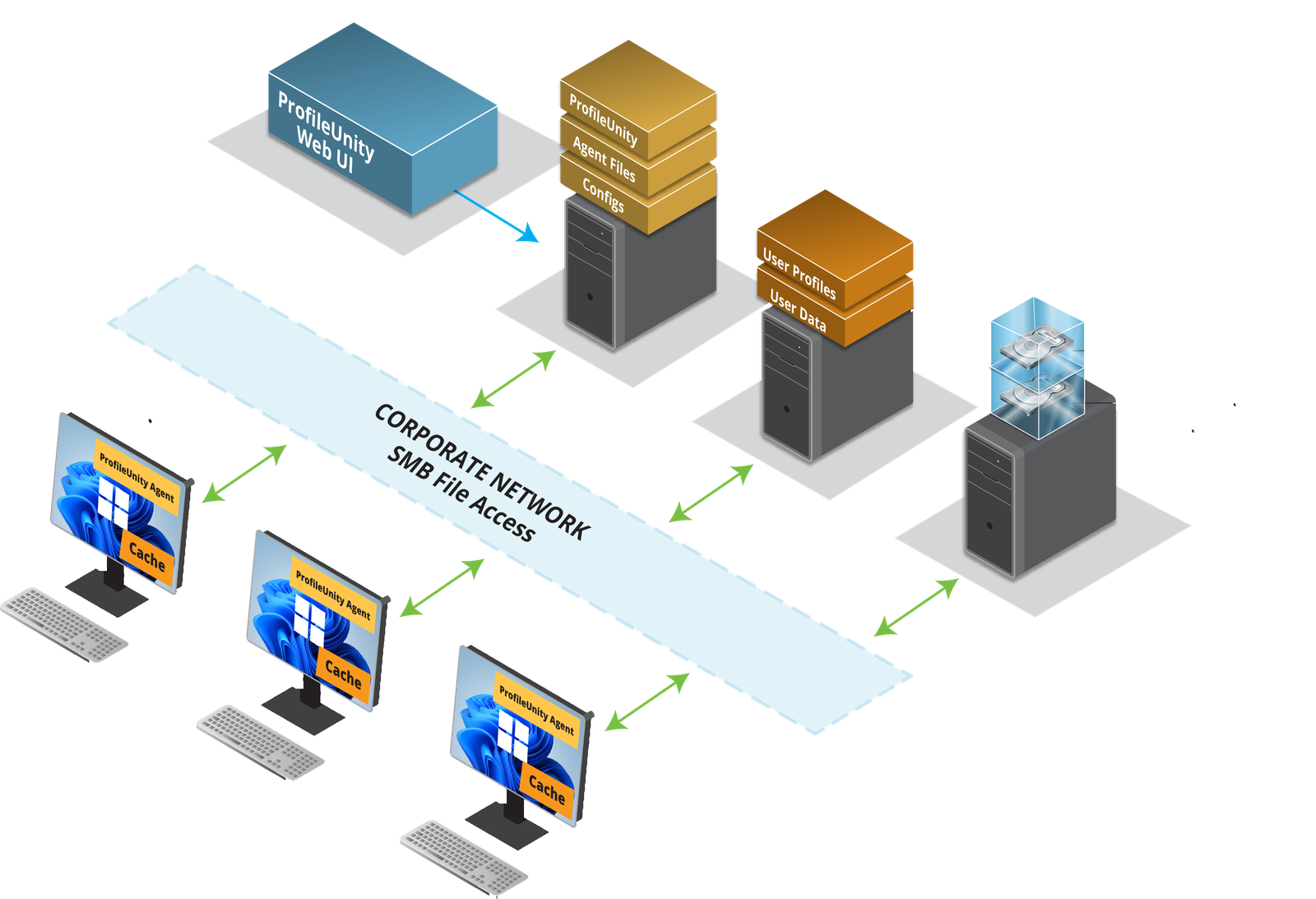
ProfileUnity natively handles what Group Policy Preferences used to do — map drives and network folders, assign printers dynamically, and manage registry keys, shortcuts, environment variables and file associations. Configuration is stored on cloud or on-premises storage, so it works for Entra ID-joined, hybrid and domain-joined devices alike.
Every GPP task. No logon scripts.
Context-Aware Filtering Beyond Item-Level Targeting
Apply policy in real time using hundreds of filter combinations — user, group, subnet or location, device type (physical PC vs. AVD or VDI session), operating system, time of day and more. Reuse your existing ADMX templates so the settings you already know carry forward, and complement Intune device management with true user-level control.
The right policy for the right user, at the right moment.
Meet ProfileUnity
ProfileUnity is Liquidware's user environment management solution. It delivers the user-side capabilities of Group Policy and Group Policy Preferences to Windows desktops — whether devices are managed by Intune, joined to Entra ID or Active Directory, or running in AVD, Windows 365 or legacy VDI — and it works alongside Intune and FSLogix.
Group Policy & GPP Replacement
-
Drive and network folder mapping by user, group or context.
-
Dynamic printer assignment by location, subnet or device.
-
Registry keys, shortcuts, environment variables and file associations.
-
Reuse existing ADMX templates — no re-learning required.
Faster Windows Logins
-
One directory lookup at login instead of one per policy rule.
-
Policies apply contextually, so only relevant rules run.
-
Retire slow, fragile logon scripts.
-
Pair with Stratusphere™ UX to see a full Windows login breakdown.
Security & Privilege Control
-
Keep users as standard users — elevate rights per app, task or installer.
-
Application cloaking hides apps from unauthorized users.
-
Allow and deny lists control which applications run and where.
-
Folder redirection and desktop lockdown settings by context.
Entra ID & Cloud Ready
-
Supports Entra ID-joined, hybrid-joined and AD domain-joined devices.
-
Policy configuration stored on native cloud or on-premises storage.
-
Works on physical PCs, AVD, Windows 365 and legacy VDI.
-
Complements Intune — Intune manages the device, ProfileUnity manages the user.
Group Policy Replacement That Checks Every Box
Group Policy Was Built for the Domain.
ProfileUnity Is Built for Today.
Group Policy served domain-joined desktops well for decades. Today's Entra ID, Intune, AVD and Windows 365 environments need user policy that doesn't depend on line-of-sight to a domain controller. ProfileUnity gives you the GPO and GPP control you rely on — with faster logins and finer targeting — in one solution that travels with the user, everywhere they work.
Stop scripting. Start managing.
One console. Every user. Any Windows desktop.
See What Organizations Achieve with ProfileUnity

Trusted by enterprise organizations worldwide.
See ProfileUnity in Action
Get the ProfileUnity Whitepaper

Why IT Teams Choose Liquidware
One Solution. Every Environment.
ProfileUnity is platform-agnostic by design — works across physical PCs, AVD, Windows 365 and legacy VDI such as Citrix and Omnissa desktops, with Entra ID or Active Directory. One policy console instead of separate scripts for each platform.
Enterprise Scale. Proven Results.
Trusted by 1,000+ enterprises worldwide. Customers save an average of $250 per user annually and reduce workspace management costs by 30%. 91% report noticeable OPEX savings. 99% support satisfaction rate.
Simpler IT. Happier Users.
Faster logins, consistent drive and printer mappings, and no broken logon scripts — even as you move devices from Active Directory to Entra ID. Fewer tickets. Happier users.
All designed to reduce complexity and keep users productive through change.
What's Replacing Group Policy Scripts Worth?
Liquidware Value Calculator
No consultants. No waiting on someone to run the numbers. The Liquidware Value Calculator delivers a snapshot of your potential savings, efficiency gains, and ROI in under 60 seconds.