
From Mystery IOPS to Measurable Wins: Stratusphere UX + ProfileUnity (with a little AI magic)

From Mystery IOPS to Measurable Wins: Stratusphere™ UX + ProfileUnity (with a little AI magic)
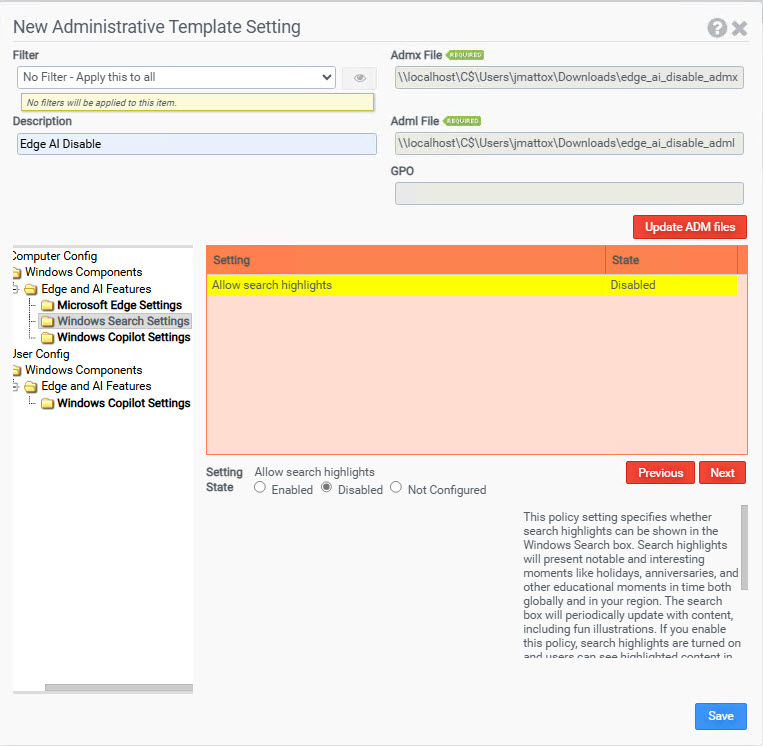
A children’s hospital saw profile-backed storage get slammed by unexpected IOPS. Stratusphere™ UX pinpointed Microsoft Edge as the culprit after a feature change increased local activity. We locked the behavior down with policy and used AI to convert a GPO screenshot into a ready-to-deploy .reg and ADMX/ADML. Then ProfileUnity could be used to apply the fix across domain-joined, Entra-joined, physical, virtual, and cloud endpoints.
1) Detect & Diagnose with Stratusphere™ UX
Problem: Profile shares behind a Citrix XenApp farm were suddenly running hot read/write IOPS spikes, sluggish sessions, intermittent profile ops.
What Stratusphere™ UX did:
- Correlated IOPS spikes with specific processes and profile paths.
- Surfaced Microsoft Edge as the common actor across affected sessions.
- Timeline views made the update window and workload change obvious.
Takeaway: In minutes, “storage is slow” became “Edge’s new local activity is generating heavy profile churn in a multi-user, profile-on-storage design.”
2) Define the Fix (from GPO) — Then Let AI Do the Typing
We worked with Microsoft guidance to select policy settings that reduce the local activity driving the IOPS. Instead of hand-transcribing policy, we could use AI to transform a single screenshot of the GPO console into two artifacts:
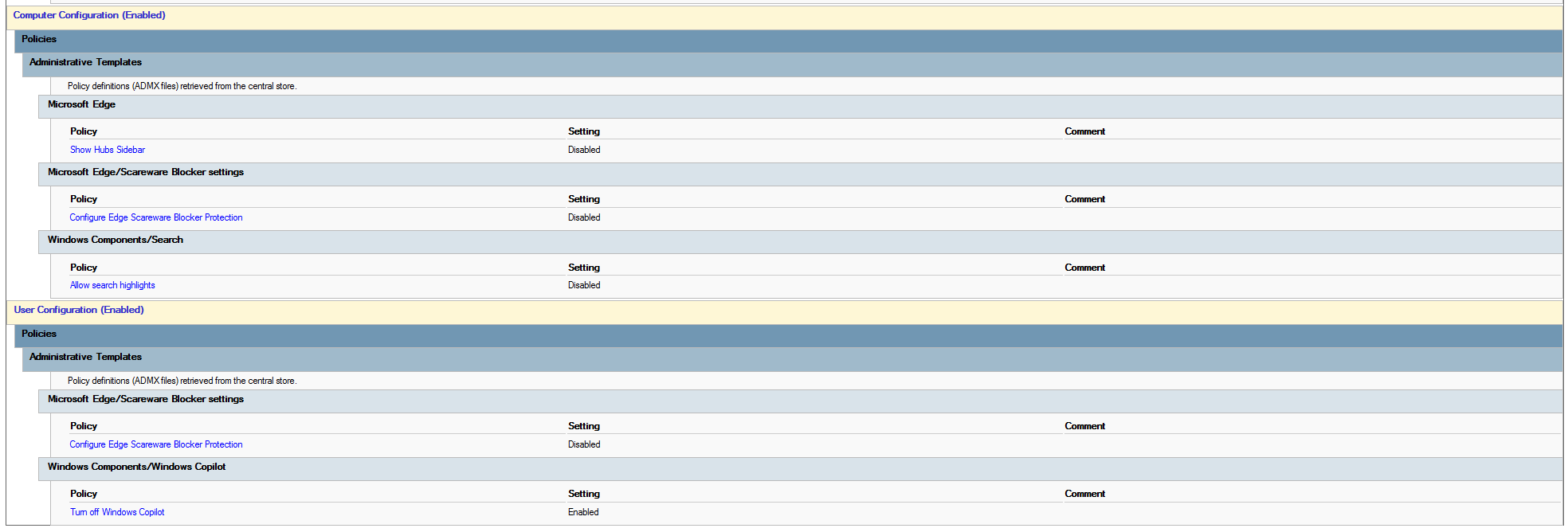
- A .reg file (quick enforcement or import into ProfileUnity’s Registry module)
- A custom ADMX/ADML pair (for long-term, readable, toggleable policy)
How to go from GPO screenshot ? .reg + ADMX/ADML with AI
- Capture the GPO settings screenshot (clear enough to read policy names/paths).
- Prompt AI: “Convert this GPO screenshot into a .reg file with all keys/values. Then produce a minimal ADMX and English ADML with the same settings.”
- Review the output (keys, value types, and scopes).
- Test the .reg on a pilot device; validate expected behavior.
- Optionally refine display names/descriptions in the ADMX/ADML for clarity.
Pro tip: Keep both artifacts. The .reg is perfect for rapid mitigation; the ADMX/ADML is ideal for long-term hygiene, versioning, and easy toggles.
3) Deploy Everywhere with ProfileUnity
Option A — Registry Module (fastest path)
- Import the AI-generated .reg into ProfileUnity ? Registry.
- Apply via Filters (delivery group, device type, user role, site, OS build).
- Ship to domain-joined or Entra-joined devices—no traditional GPO needed.
When to use: You want the quickest route from fix ? fleet.
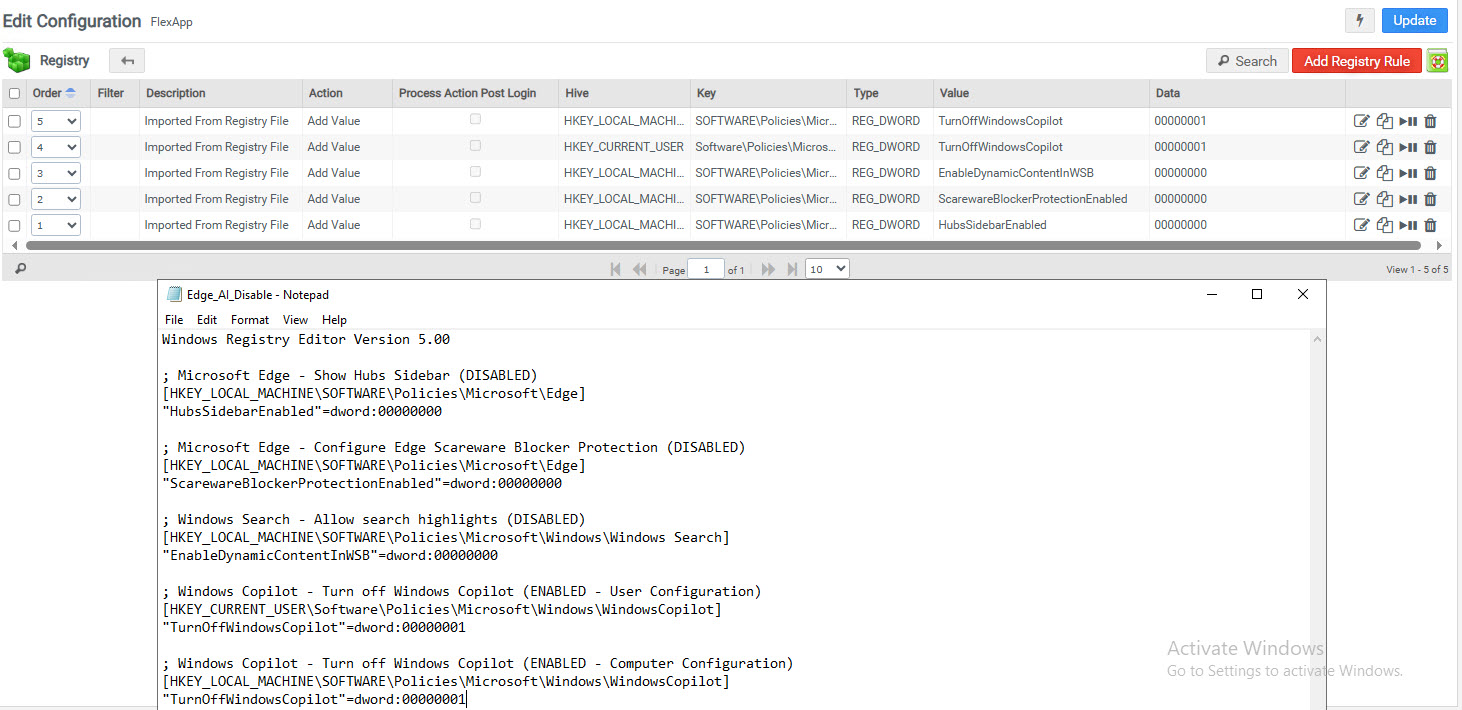
Option B — ADMX Module (preferred for maintainability)
- Upload the AI-generated ADMX and ADML (en-US) to ProfileUnity ? ADMX.
- The settings appear as readable policies you can toggle per config.
- Use Filters for precise targeting across physical/virtual/cloud.
When to use: You want clean policy semantics, auditability, and simple UX for future changes.
4) Target Smartly with ProfileUnity Filters
Apply the fix only where needed:
- Delivery group (XenApp vs. VDI vs. physical)
- User role (clinical vs. back office)
- OS/Build (Windows 10/11 variants)
- Site/Network (on-prem vs. cloud region)
This preserves user experience where the features are valuable while protecting shared storage.
5) Outcomes
- IOPS normalized on profile tiers
- Smoother sessions and fewer logon delays
- Repeatable posture for future feature shifts
- GPO-free control options for Entra-joined fleets via ProfileUnity