
The App You Installed Last Tuesday is Already a CVE
You built the image. You tested the apps. You shipped it to production. Everything works.
Six days later a Common Vulnerability and Exposure (CVE) lands on one of those apps. Not a theoretical one. A remote code execution with a public proof of concept and a vendor advisory telling you to move to the next build immediately.
Now what?
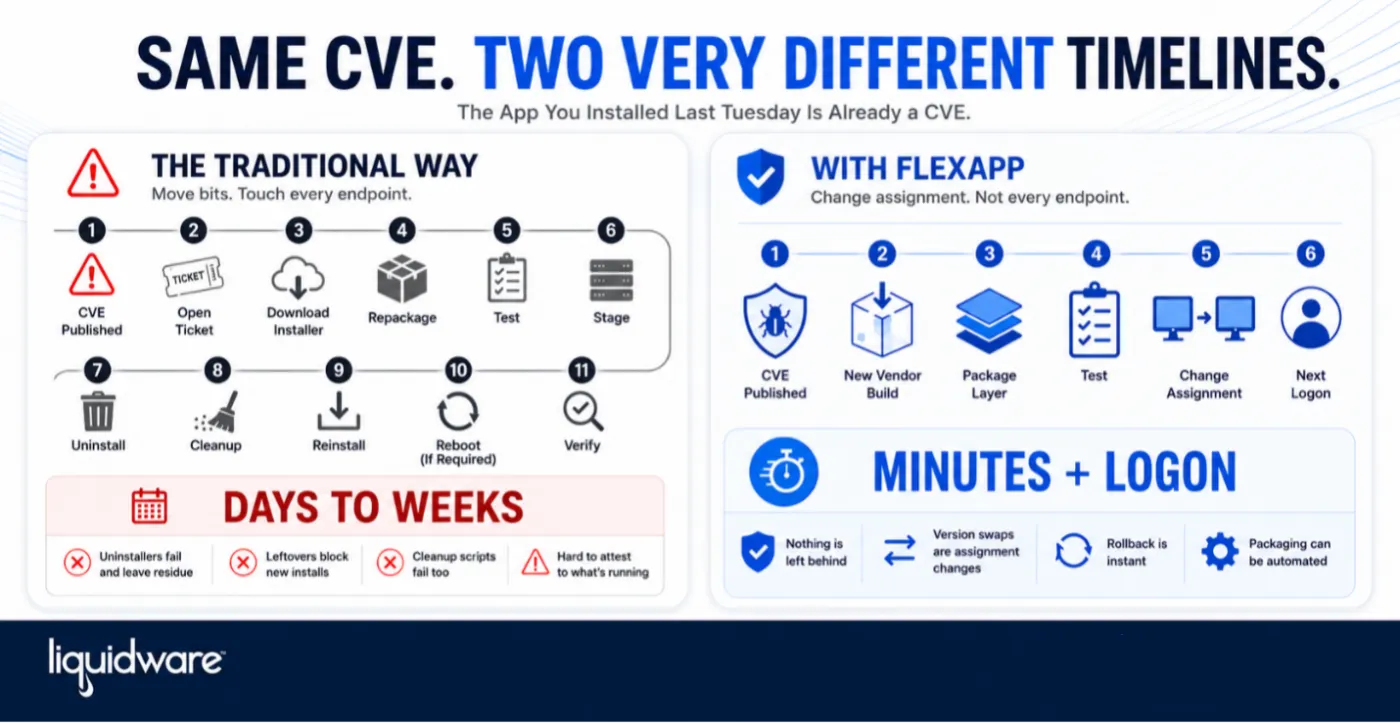
For most Windows shops, "now what" means opening a ticket, pulling the new installer, repackaging it, testing it, staging it, and then pushing an uninstall and reinstall across every desktop that has it. On a good week that takes days. On a bad week it takes weeks, because the uninstall does not go cleanly, and cleaning up after a failed uninstall is its own project.
Multiply that by thousands of applications across thousands of desktops and the math doesn’t math anymore.
The real problem is not patching. It is moving bits…
Traditional application management moves files. Every remediation is a physical operation on every endpoint: run the uninstaller, delete what it left, write new files, register new components, reboot if the installer demands it.
Every one of those steps can fail, and when they fail they fail quietly:
-
The uninstaller exits with a success code but leaves registry keys, services, drivers, and orphaned directories behind.
-
The new version detects those leftovers, decides an incompatible install is already present, and refuses to run.
-
Someone on your team writes a cleanup script. Then another for the version after that. Then another for the three machines where the cleanup script itself failed.
-
Your remediation report says 94 percent complete and nobody can tell you with confidence what the other 6 percent are actually running.
That last part is the one that matters to your auditors and to your insurance carrier. You cannot attest to a fleet you cannot deterministically return to a known state.
None of this is a tooling gap in your patch product. It is a consequence of the application living inside the operating system, mixed into the same file system and registry as everything else.
FlexApp changes what a remediation actually is…
FlexApp packages an application into its own layer that attaches at logon and detaches at logoff. The application is not installed into the desktop. It is presented to the desktop.
That single architectural difference changes the remediation model:
-
Nothing is left behind.
FlexApp layers are non-persistent. When the layer detaches, the application is gone. There is no residue, no half-removed service, no stale registry hive waiting to block the next version. The condition that forces you to write cleanup scripts does not occur. -
Version swaps are assignment changes, not installs.
Remediating a vulnerable app means pointing the assignment at the patched layer. At the next logon the user gets the fixed version. There is no uninstall sequence to fail, no reboot to schedule, no per-endpoint transaction to babysit. -
Rollback is the same operation in reverse.
If the patched build breaks a line of business workflow, you reassign the previous layer. That is a decision you can make in the middle of a business day instead of a change window three weeks out. -
Packaging can be automated.
Build a pipeline that pulls in the new installer, packages it into a FlexApp, runs your smoke tests, and publishes it. The vendor ships a fix, your pipeline produces a layer, and you assign it. The manual repackaging step that normally sits in the middle of your response time comes out of the critical path.
The result is that the distance between "vendor published a fix" and "no user is running the vulnerable version" is measured in minutes and logons, not days and change tickets.
Look at what is actually installed on your desktops…
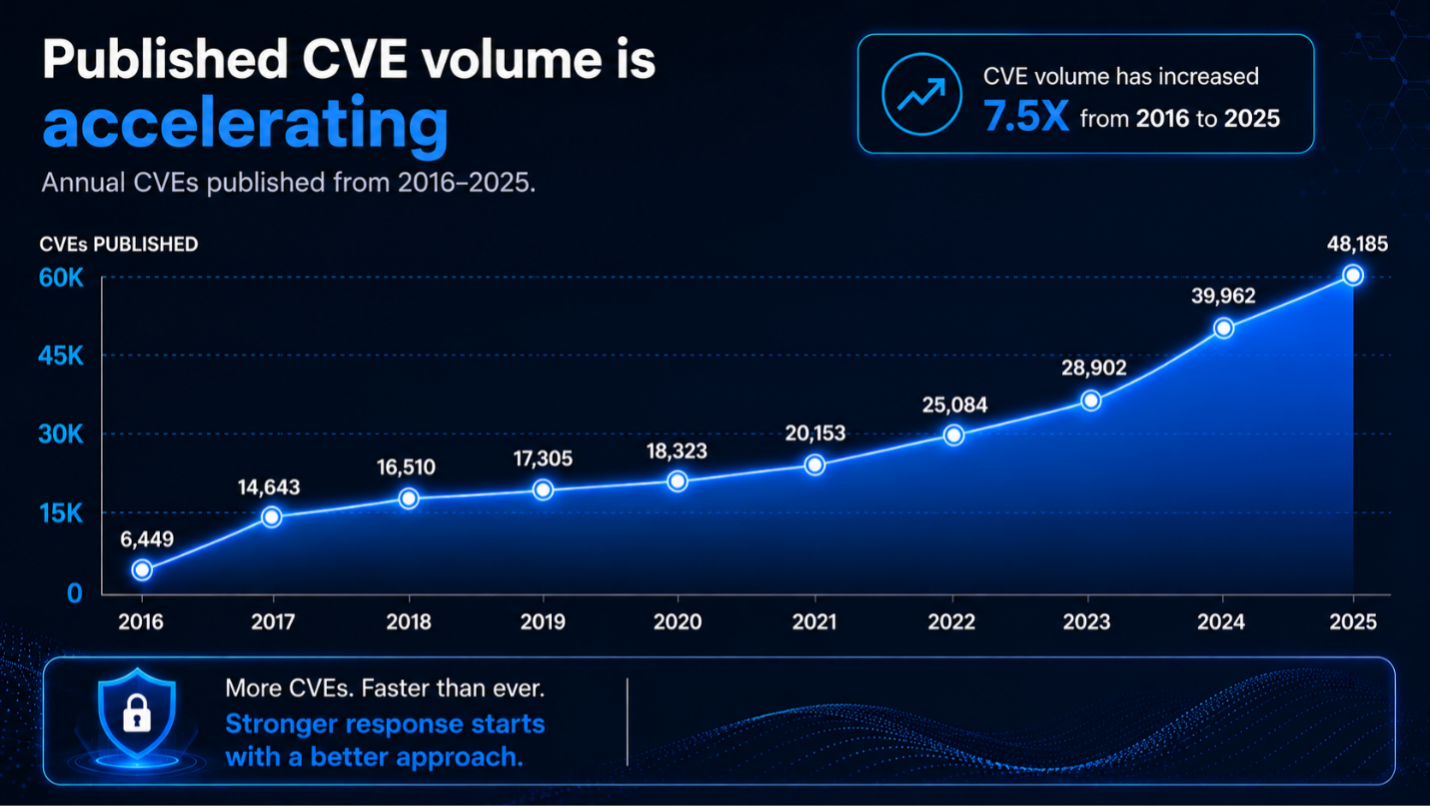
The industry-wide CVE numbers are useful for headlines, but a lot of that volume comes from places that have nothing to do with your endpoints. Linux kernel bug fixes, WordPress plugins, and database platforms inflate the totals without ever touching a user desktop.
Narrow the view to the third party applications that actually sit on a Windows, and the picture gets worse, not better. These are the browsers, PDF readers, archive utilities, runtimes, and collaboration clients that show up in every environment.
-
Browsers. Google shipped Chrome 150 in July 2026 with fixes for 382 vulnerabilities in a single release, 15 of them critical. The June release fixed 74. The April release fixed 60. Chrome saw eight actively exploited zero-days across all of 2025. It hit four zero-days by the first day of April 2026. HP Wolf Security's analysis of 2025 found that users of Chromium-based browsers, which hold roughly 95 percent of browser share, spent 87 days of the year, 22 percent of it, exposed to at least one actively exploited zero-day.
-
PDF readers. CVE-2026-34621 in Adobe Acrobat and Reader was exploited in the wild since late November 2025 and was not patched until Adobe's emergency release in April 2026. Opening a malicious PDF was enough to trigger it. Then Adobe had to ship a second emergency update days later because CVE-2026-34622 bypassed the first fix. If you spent a week deploying the patch, you got to do it again immediately.
-
Archive and utility apps. WinRAR's CVE-2025-8088 was patched in July 2025. A year later, Google's Threat Intelligence Group described exploitation as widespread and ongoing, attributed to a list of state-linked groups including RomCom, Gamaredon, and Paper Werewolf. WinRAR has no auto-update mechanism and roughly 500 million users. If your endpoint team does not push it, it does not get patched.
-
Business applications. Action1's 2026 Software Vulnerability Ratings Report found that total disclosed vulnerabilities rose 92 percent year over year, remote code execution vulnerabilities rose 128 percent, and critical vulnerabilities roughly doubled. Exploitation of enterprise applications surged 800 percent. Critical vulnerabilities in office productivity tools rose 229 percent.
The window is closing faster than the response…
Two numbers explain why the architecture matters more than the tooling.
Mandiant's M-Trends 2026 puts the mean time to exploit at negative seven days. On average, attackers are already using the flaw before the fix exists.
The Verizon 2026 DBIR reports a median of 43 days for organizations to remediate a known exploited vulnerability, and that only 26 percent of CISA KEV entries ever get fully fixed.
That gap between minus seven days and plus 43 days is the whole problem, and three quarters of the time it never fully closes.
AI is widening it. Microsoft's engineering leadership has publicly said that AI-assisted vulnerability discovery is why oversized Patch Tuesdays are becoming normal. Whether a bug was found by a researcher, a fuzzer, or an agent does not change your obligation. It lands in your scanner, starts your SLA clock, and requires a documented remediation on every affected endpoint.
Worth noting for balance: VulnCheck's mid-2026 analysis found that AI-discovered vulnerabilities are not yet being exploited at a rate proportional to the discovery surge. That is a fair caveat about attacker behavior. It is not relief for the operations team, because the disclosure volume is what drives the work.
Response time is the control…
Security programs are graded on mean time to remediate. That number is not determined by how good your scanner is. It is determined by how expensive it is to change what is running on an endpoint.
If changing an application means an uninstall, a cleanup, a reinstall, and a reboot on every machine, your MTTR is structurally capped no matter how much automation you layer on top. If changing an application means changing an assignment, your MTTR becomes a function of logon frequency.
That is the difference between a security posture you defend in an audit and one you apologize for.
Where to start…
Pick your ten highest risk third party applications. The ones with the most frequent CVEs, the widest deployment, and the worst uninstall behavior. Browsers, PDF readers, runtimes, archive utilities, media components, the usual list.
Package those as FlexApps. Build the automation around them. Then measure the same thing twice:
-
how long it took you to remediate those apps last quarter,
-
and how long it takes now.
Do that math before the next CVE lands, because at the current rate it is going to land next week.
Learn more: Liquidware FlexApp