
SOLUTION: AVD SELF-HEALING & AUTONOMY
Self-Healing AVD That Keeps Itself Correct.
Fix Drift and Broken Hosts, No Ticket Needed.
FleetCTRL™ detects drift and repairs broken Azure Virtual Desktop (AVD) session hosts automatically, with guardrails and every action audited in your own tenant. Your admins spend their time on projects instead of tickets.
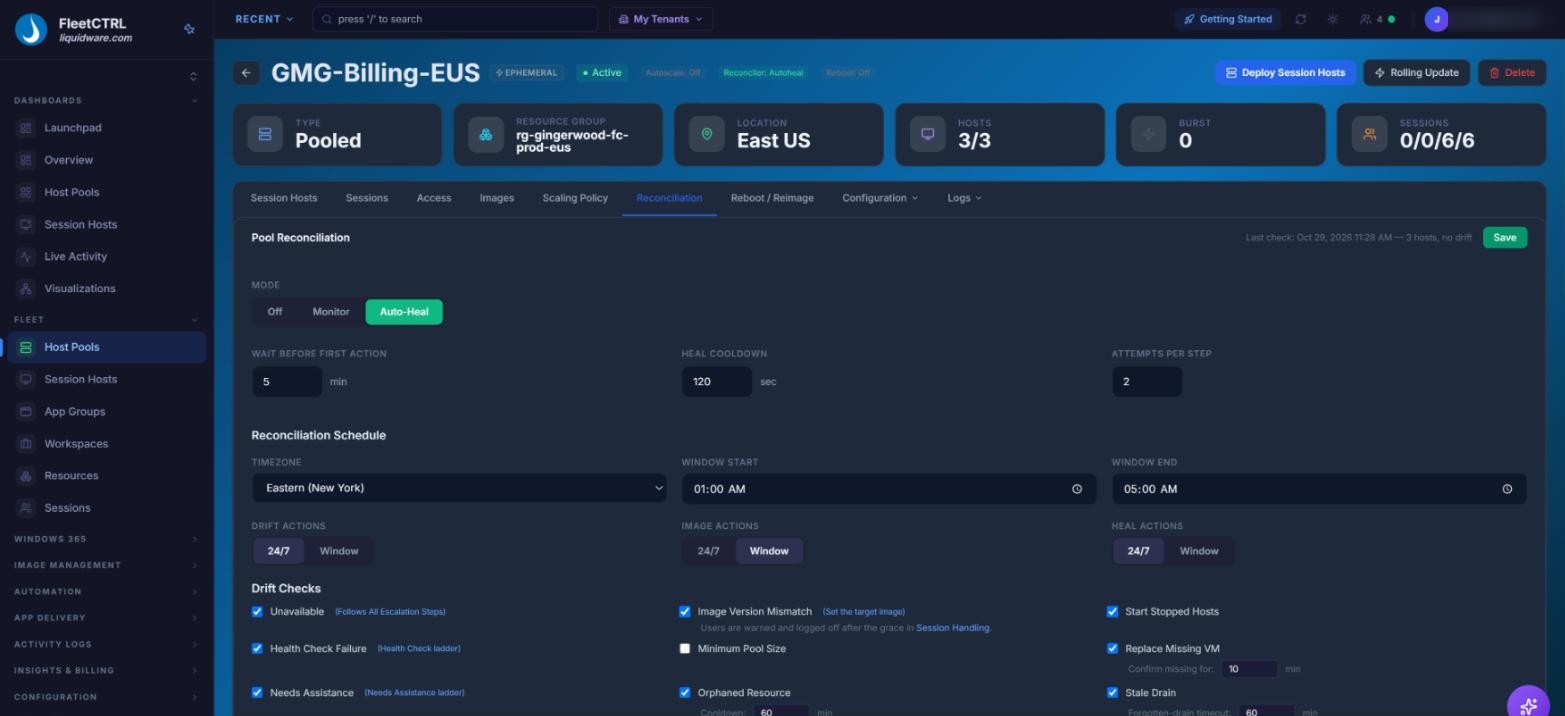
Pool reconciliation for a Gingerwood Medical Group pool: Auto-Heal mode, a maintenance window for image actions, and the drift checks FleetCTRL runs.
AVD at Enterprise Size Means
a Steady Stream of Tickets
At enterprise size, AVD session hosts drift from their image, agents stop responding, hosts drop out of rotation, and rollouts go sideways at 2 a.m. Every one turns into a ticket, and fixing it often takes an Azure expert in the portal.
FleetCTRL replaces that daily work in the Azure Portal with AVD that keeps itself correct. Hosts stay the way the image left them, and problems get fixed without anyone opening a ticket.
Self-healing in FleetCTRL works three ways:

Detects Drift as It Happens
FleetCTRL continuously compares every session host with how it’s supposed to be, checking for unavailable hosts, failed health checks, image version mismatches, stopped hosts and orphaned resources.

Heals Step by Step
It starts with the lightest fix, restarting the AVD agent, and escalates only if needed: re-registering the host, then rebuilding a pooled host from its image. Hosts are drained before every action.
Rollouts That Check Their Own Work
A host counts as updated only when it’s Available and matches the target image. Crash recovery and a circuit breaker stop a bad rollout from spreading, and one-click Rollback reverses it. See image management.
FleetCTRL: Autonomy with guardrails, so your admins stay in control.
Automation on Schedule and on Event
-
Post-deploy triggers run your scripts automatically On Join, On Provision, On Working Copy Ready, On Start or On Demand, and autoscaling and bursting add and remove capacity on their own.
You Set the Rules
-
Choose Off, Monitor or Auto-Heal for each pool, limit image and heal actions to a maintenance window, and preview scaling policy outcomes before they take effect. Automation checks that everything is in place before it runs.
Approved Choices, Enforced
-
Approved regions, images and hardware are enforced, so automation builds only what you’ve signed off on.
Any Admin, Not Just Azure Experts
-
Role-based access gives each admin just the role they need, so more of your team can safely run AVD. FleetCTRL replaces the Azure Portal for daily operations.
Every Action Audited
-
FleetCTRL’s tamper-protected audit log names the admin and role, or the scheduled automation, behind every action, including ones that never become an Azure API call. Actions are mirrored in your Azure Activity Log, entries are recoverable, and logs export as JSON for your SIEM.
Cleans Up After Itself
-
A background scanner removes leftover temporary resources every 5 minutes, and stuck working and testing copies are cleaned up automatically. No orphaned VMs quietly running up the bill.
Coming From Citrix? Clean Hosts Without Waiting for a Reboot.
Legacy VDI such as Citrix and Omnissa desktops relies on the non-persistent reset at reboot to clear drift. FleetCTRL fixes drift as it happens, between reboots, with no provisioning servers to run.
It’s the discipline you already trust, with less to babysit, and a confident way to run AVD.
What Changes With FleetCTRL
| Situation | With FleetCTRL | The Usual Process |
| AVD agent stops responding | Restarted automatically, the lightest fix first | A ticket, then an admin in the Azure Portal |
| Host drops out of registration | Re-registered automatically | Re-registered by hand |
| Host drifts from its image | Detected and reconciled; a pooled host can be rebuilt from its image | Found when users complain |
| Rollout goes wrong | Crash recovery, a circuit breaker and one-click Rollback | An admin steps in, often late at night |
| Leftover temporary resources | Removed every 5 minutes | Orphaned VMs and disks on the bill |
| Who can fix it | Any admin with the right role | An Azure expert |
| Record of what happened | Every action audited, including automated ones | Pieced together from portal logs |
Pair FleetCTRL with the rest of the suite and self-healing goes further. Stratusphere™ UX shows the user experience behind a “healthy” host. CommandCTRL™ gives real-time endpoint support when a user needs help now. ProfileUnity™ keeps profiles portable when hosts are rebuilt. FlexApp™ keeps apps out of the image, so rebuilds stay fast and clean.
FleetCTRL runs where you need it: in your own Azure tenant or on-premises, not as SaaS, and it’s GovCloud compatible. It also manages Windows 365 Cloud PCs from the same console. Explore FleetCTRL.
Citrix is a trademark of its respective owner. Self-healing, drift correction and host repair apply to AVD session hosts. FleetCTRL is in Preview; capabilities described reflect the Preview release and may change.
Any way a session host no longer matches how it’s supposed to be. FleetCTRL’s drift checks include unavailable hosts, failed health checks, hosts that need assistance, image version mismatches, stopped hosts, missing VMs, stale drains and orphaned resources.
FleetCTRL drains a host before every heal action, so new sessions go to healthy hosts.
Yes. Each pool can be set to Off, Monitor or Auto-Heal, and drift, image and heal actions can be limited to a maintenance window.
No. Microsoft runs Windows 365 Cloud PCs in its own service, so self-healing applies to AVD session hosts. FleetCTRL also manages Windows 365 Cloud PCs from the same console.
Yes. Any pool can be released back to native Azure management whenever you want, so autonomy never becomes lock-in.
FleetCTRL is announced. The Preview opens in Q1 2027 by application, subject to approval, and general availability is planned for 2027.
Ready for AVD That
Keeps Itself Correct?
The FleetCTRL Preview opens in Q1 2027.
Apply now to be first in line.