
FleetCTRL™
Enterprise Orchestration for
Microsoft Azure Virtual Desktop and Windows 365
In PREVIEW Now — GA Planned 2027
Simplified Azure Management and a Lower Bill from Day One
FleetCTRL is the enterprise platform that completes Azure Virtual Desktop (AVD). It right-sizes and scales AVD host pools and session hosts, manages images and user sessions, brings Windows 365 Cloud PCs into the same console, and runs inside your own Azure tenant so your data, credentials and control stay with you.
Provable savings
Self-healing hosts
Your tenant, your control
Still Running AVD by Hand in the Azure Portal?
Azure gives you capacity, but you still have to operate it. Teams lose hours resizing pools, patching images, chasing broken hosts and explaining the Azure bill. FleetCTRL turns that day-to-day work into policy-driven operations.

One Console for Every AVD Operation
Host pools, session hosts, sessions, scripts, scaling and images in one place, with far less time spent in the Azure Portal.

An Environment That Doesn’t Drift
Eight types of drift are detected and corrected automatically, so every pool stays in the state you intended.

Savings You Can Prove
The cost dashboard shows savings from the first scaling action, so Finance gets the numbers without a spreadsheet exercise.
One Console to Orchestrate, Scale and Secure
FleetCTRL replaces day-to-day work in the Azure Portal with one console to monitor, manage and automate Azure Virtual Desktop, from host pools to images, scaling and cost, and manage Windows 365 Cloud PCs alongside it.
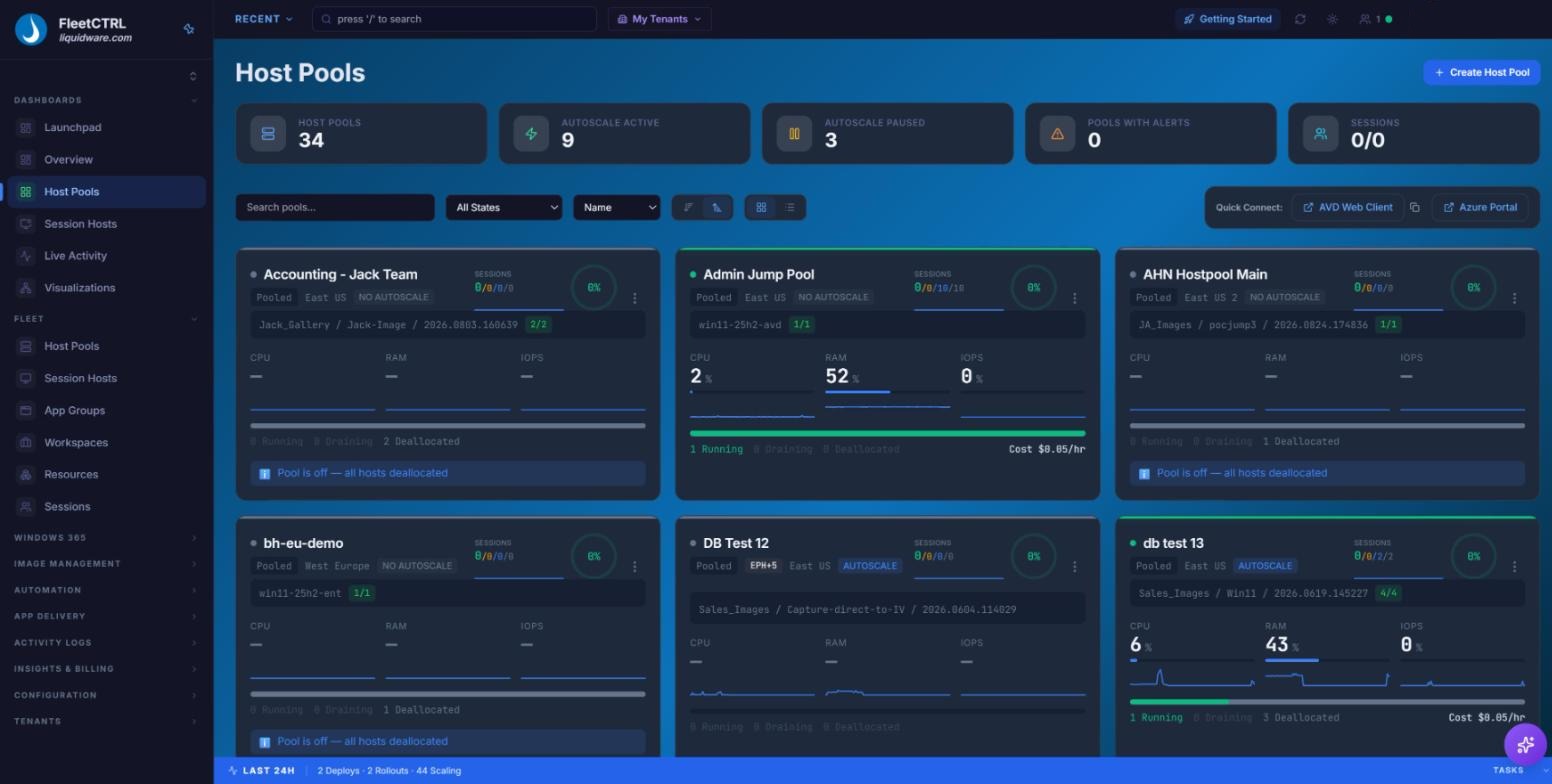
One purpose-built console for administrators, desktop engineers and helpdesk teams:
- Real-time dashboards for pools, hosts and sessions
- Autoscaling on session, CPU and RAM triggers
- On-demand burst capacity with zero idle cost
- Versioned images with wave-based rolling updates
- Self-healing hosts with no admin intervention
- Windows 365 Cloud PCs managed alongside AVD
- An immutable, exportable audit trail
Autoscaling & Burst
Image Lifecycle
Drift Reconciliation
Cost Insights
Windows 365 Cloud PCs
See FleetCTRL in Action
A look inside the console your team will use every day. Click any screen to enlarge it.
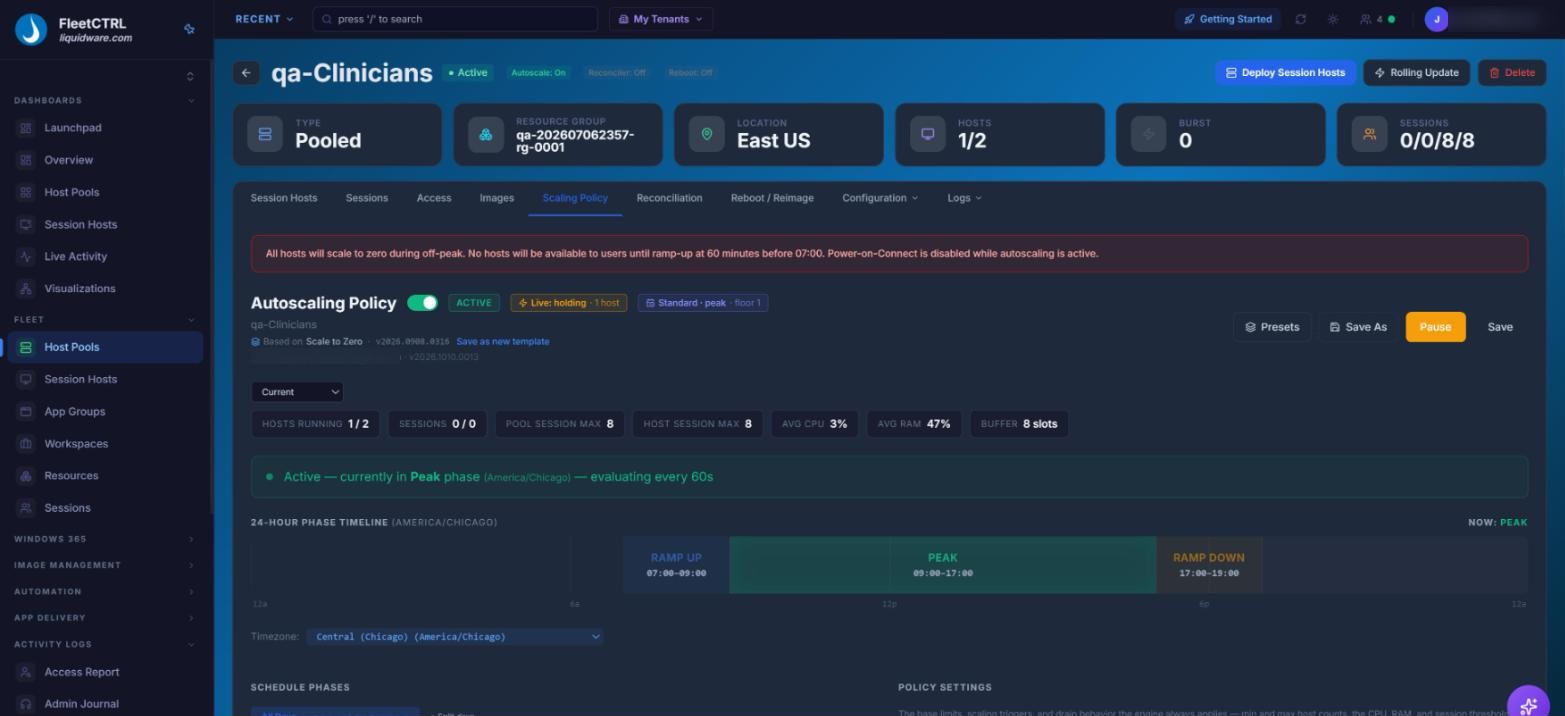
Autoscale
Pools scale out and in on session, CPU and RAM triggers, with every scaling action logged. See how AVD autoscaling works
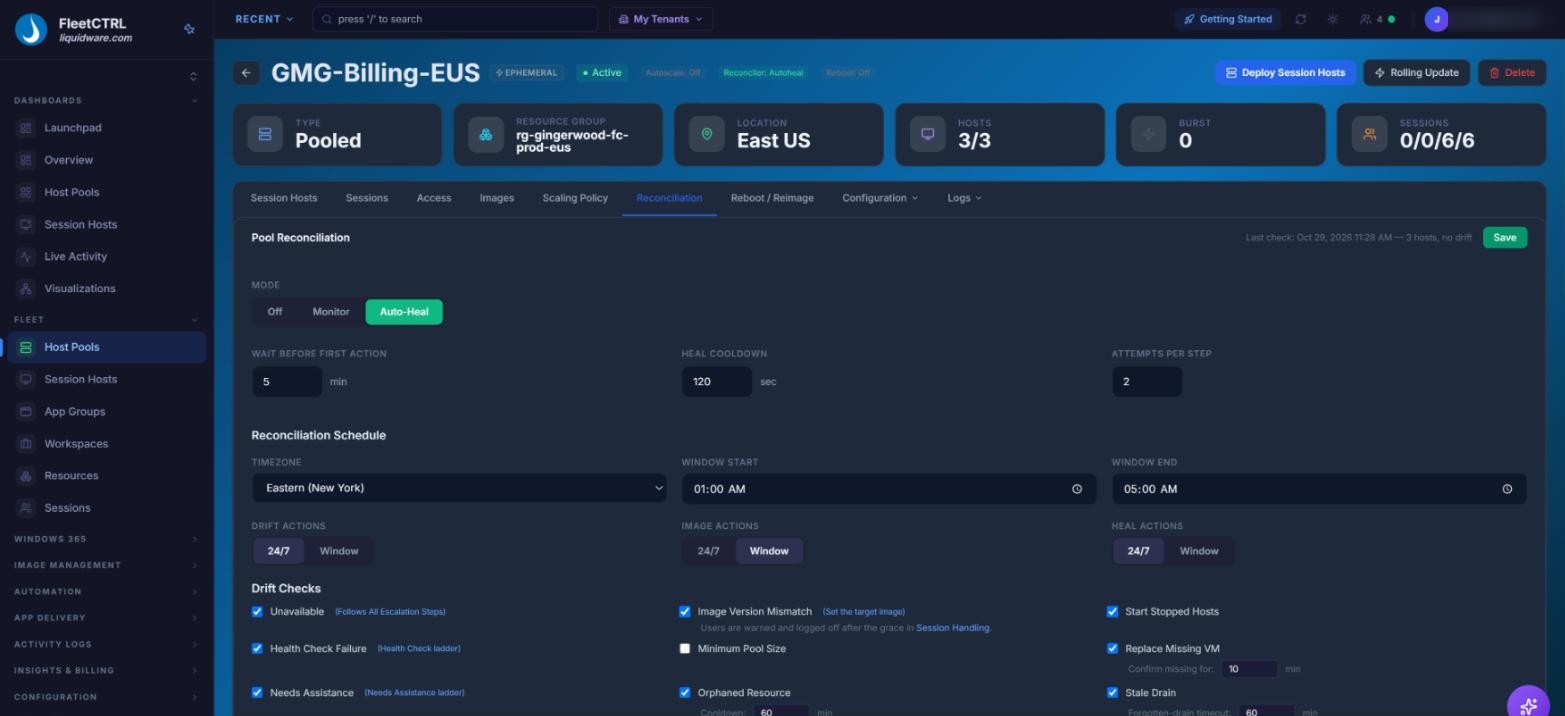
Self-Healing
Reconcilers detect drift and repair hosts on their own, from restart to rebuild from image.
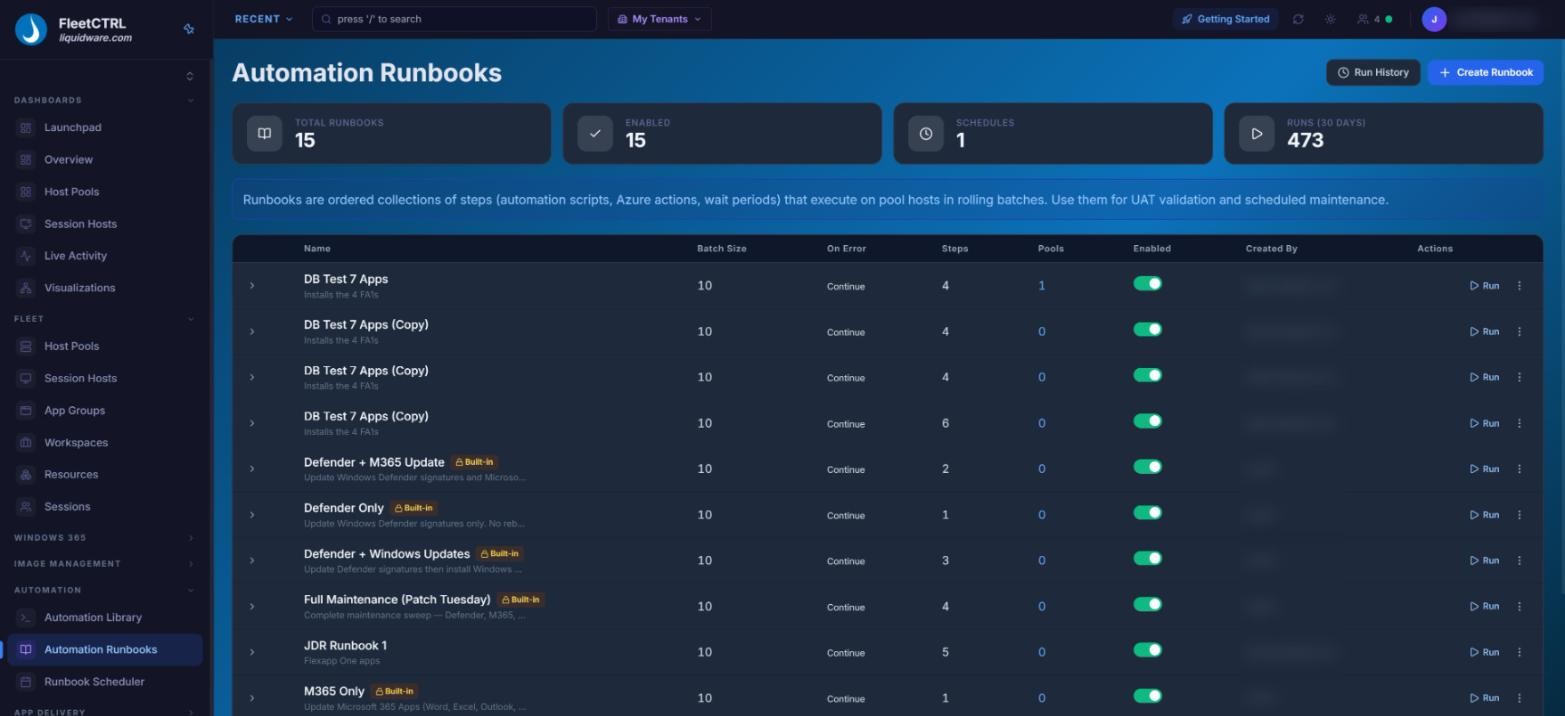
Automations and Runbooks
Chain scripts, Azure actions and wait periods into runbooks that run on hosts in rolling batches.
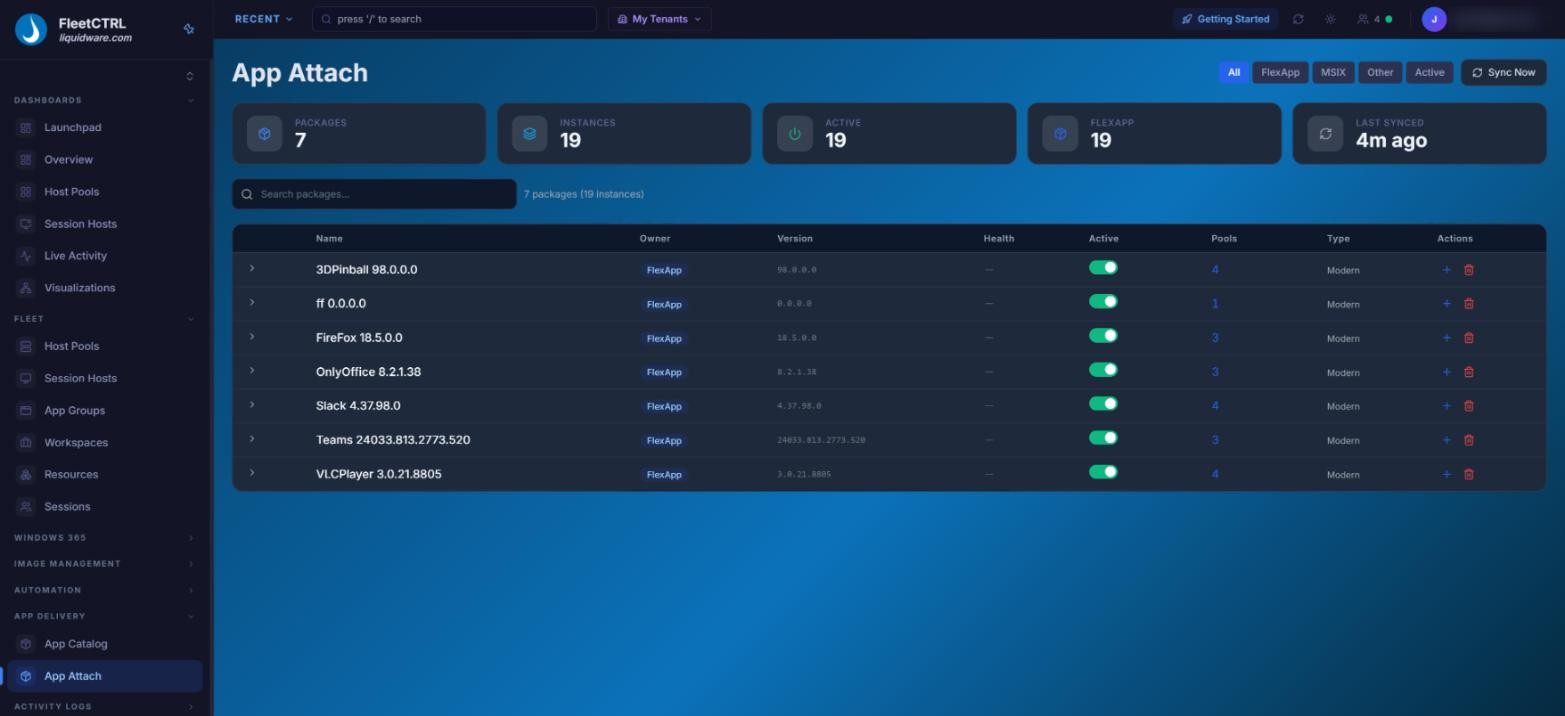
FlexApp™ App Attach
Deliver FlexApp™ and MSIX packages to host pools and track every instance in one view. All other App Attach partners are also supported. Explore app strategy for AVD and Windows 365
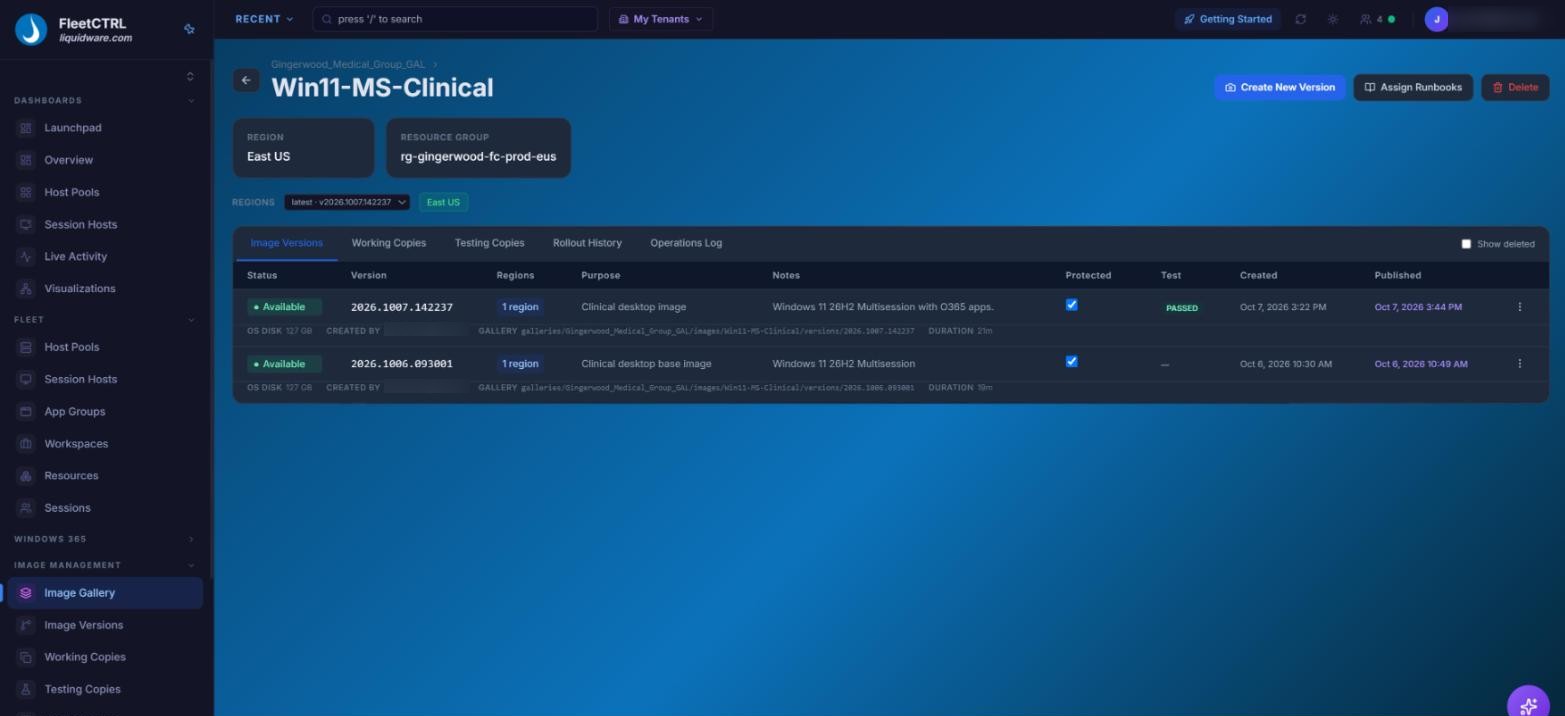
Image Management
Galleries, versions and testing copies keep golden images organized and ready to roll out. See how image management works
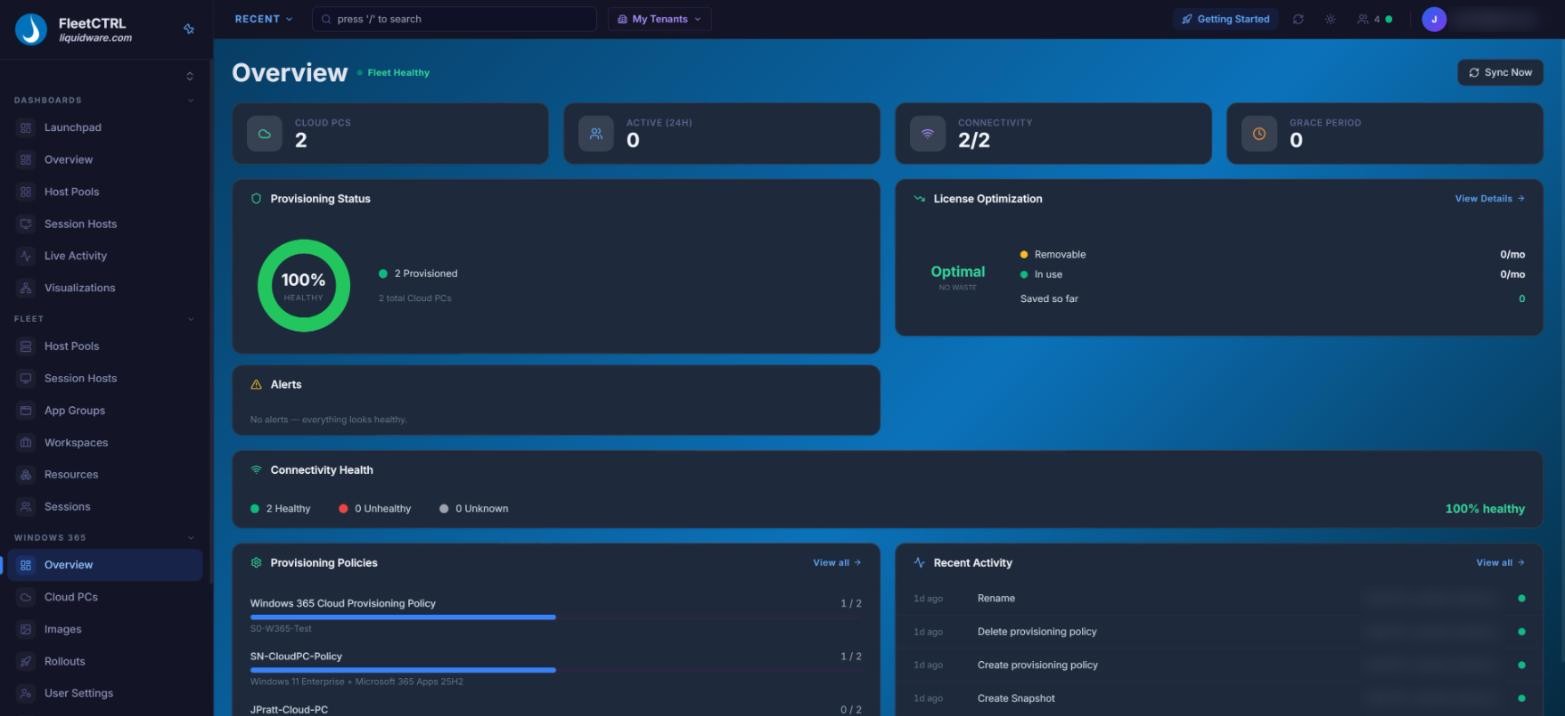
Windows 365 Management
Provisioning, connectivity and license use for Cloud PCs, right alongside AVD.
Azure Virtual Desktop and Windows 365, Side by Side
Run AVD host pools and Windows 365 Cloud PCs from one console. Each platform gets the capabilities that fit it, with image management, admin roles and the audit trail shared across both.

Azure Virtual Desktop
- Autoscaling and on-demand burst capacity
- Drift detection and automatic correction
- Self-healing session hosts
- Cost Insights with provable savings

Windows 365
- Staged image rollouts, with advance notice to users and a snapshot taken first
- Bulk and scheduled Cloud PC actions, from provisioning to reprovisioning
- Scheduled power on and off for Frontline Cloud PCs
- Cloud PCs stay in Microsoft's service under your existing licenses
Across Both
- Image management for AVD hosts and Cloud PCs
- Admins scoped to the management groups they cover
- An audit trail naming the admin behind each action
- Runs in your own Azure tenant or on-premises
FleetCTRL Technical Preview
Be first in line for simpler desktop operations.
Join the technical preview and help shape a clearer way to manage Azure Virtual Desktop and Windows 365.
01
Early access
We’ll let you know as soon as your preview is ready.
02
Direct updates
Get practical preview news from the FleetCTRL team.
Built for Organizations Where Desktop Availability Is Non-Negotiable
From federal agencies and healthcare to enterprises running around the clock, FleetCTRL delivers the outcomes that matter most.

Provable Savings
Autoscaling, on-demand burst and disk tier switching lower your Azure bill. Cost Insights adds trends, reserved instance recommendations, user attribution and forecasting.

Total Control
Enforced images and VM sizes, image mismatch detection and reconciliation policies keep every pool exactly as designed. Discovered pools stay read-only until you choose to manage them.

Autonomous Operations
Broken hosts fix themselves, from restart to rebuild from image, with draining before every action. A built-in assistant and Scaling and Threshold Advisors recommend your next move.

Locked-Down Security
High Security Mode uses Windows LAPS instead of stored admin passwords, every action lands in an immutable audit log, and federal builds include a FIPS 140-3 validated cryptographic module.

A Clear Path off Legacy VDI
A purpose-built console for teams that know legacy VDI such as Citrix and Omnissa desktops, but not yet Azure. Move to AVD and Windows 365 with confidence, not a crash course in the portal.

Flexible Licensing
Choose named user or concurrent licensing. Pay for the people who use AVD and Windows 365, or only for peak simultaneous users, whichever fits how your organization works.
Your Tenant. Your Data. Your Control.
FleetCTRL is not a vendor-hosted service. It runs where your security and compliance teams need it, backed by Standard & 24×7 support options.
In Your Azure Tenant
Deploy in your own Azure subscription as a single Windows service or as containers. Your team signs in with Microsoft work accounts.
On-Premises
Prefer your own data center? Run FleetCTRL on your own servers and connect it securely to your Azure tenant.

Azure Government Ready
First-class AVD support for Azure Government (GCC High) and DoD, with commercial and government tenants on one instance. Windows 365 support excludes DoD tenants.
Named User. License each person who uses AVD or Windows 365. It’s predictable and simple to budget, and a good fit for dedicated knowledge workers and persistent desktops.
Concurrent. License only the peak number of simultaneous users. It’s ideal for shift workers, clinical staff, contractors and seasonal surges, so you stop paying for people who aren’t signed in.
ProfileUnity™
Centralized User & App Management
User environment and profile management that works alongside FSLogix for fast, consistent logins.
FlexApp™
Modern App Delivery
Dynamically delivered applications keep images lean and reach every desktop on demand.
Stratusphere™ UX
DEX Monitoring & Optimization
Digital experience monitoring and visibility that pinpoints the root cause of slow or broken sessions.
CommandCTRL™
DEX Remediation in Real-time
See, diagnose and fix endpoint issues without interrupting users.
Be First to Run FleetCTRL
The FleetCTRL preview opens in Q1 2027. Applications are reviewed and approved individually, and approved organizations receive access when the preview opens.
FleetCTRL is Liquidware’s enterprise orchestration platform for Azure Virtual Desktop. It handles autoscaling, image lifecycle, drift correction, self-healing hosts and cost control from one console, and manages Windows 365 Cloud PCs from that same console.
In your own Azure tenant, or on-premises on your own servers connected to your Azure tenant. FleetCTRL is not hosted by Liquidware. Azure Government (GCC High) and DoD environments are supported. Windows 365 Cloud PC management is not available in DoD tenants.
Choose named user or concurrent licensing. Named user is simple to budget for dedicated users. Concurrent licenses only peak simultaneous users, which suits shift workers, clinical staff and seasonal demand.
Autoscaling, on-demand burst capacity and disk tier switching cut idle spend, and the cost dashboard shows savings from the first scaling action.
Apply for the preview. Applications are subject to approval, and approved organizations receive access when the preview opens in Q1 2027.
Yes. FleetCTRL manages Windows 365 Cloud PCs from the same console it uses for AVD. Admins can provision, restart, rename, resize, snapshot, restore and reprovision Cloud PCs, one at a time or in bulk, schedule power on and off for Frontline Cloud PCs, and roll new images out to Cloud PCs in batches, with advance notice to users and a snapshot taken first. Each admin sees only the Cloud PCs their management groups cover, and Windows 365 audit events show which FleetCTRL admin took the action. Cloud PCs keep running in Microsoft's service under your existing Windows 365 licenses.
Yes. FleetCTRL supports Azure Virtual Desktop running on Azure Local (formerly Azure Stack HCI).
Support for Azure Virtual Desktop hybrid deployments is on the FleetCTRL roadmap for 2027.