
Stratusphere UX 6.1.3: What’s New


We’ve recently made Stratusphere UX 6.1.3 generally available. It’s packed with enhancements and features that support the complex and varied challenges experienced in today’s end user workspaces. The release provides enhanced visibility to the critical metrics and information used to evolve the platforms, approaches and strategy supporting end user computing.
Enhancements have been made to dashboards,
greater advanced mode inspector visibility, more granular control of the process
optimization feature as well as additional client and a cloud licensing option.
Lowering the Barrier to Action
With the
release of version 6.1.3, the Stratusphere UX dashboards received enhancements
in the areas of performance and ease of use. Across the board, queries to
support widget data views have been optimized to provide better responsiveness.
Visual indicators have been added, providing component loading progress and
status of background data refresh. Other ease of use features have been added
to greatly enhance dashboard customization, dashboard searches and the setting
of preferences.
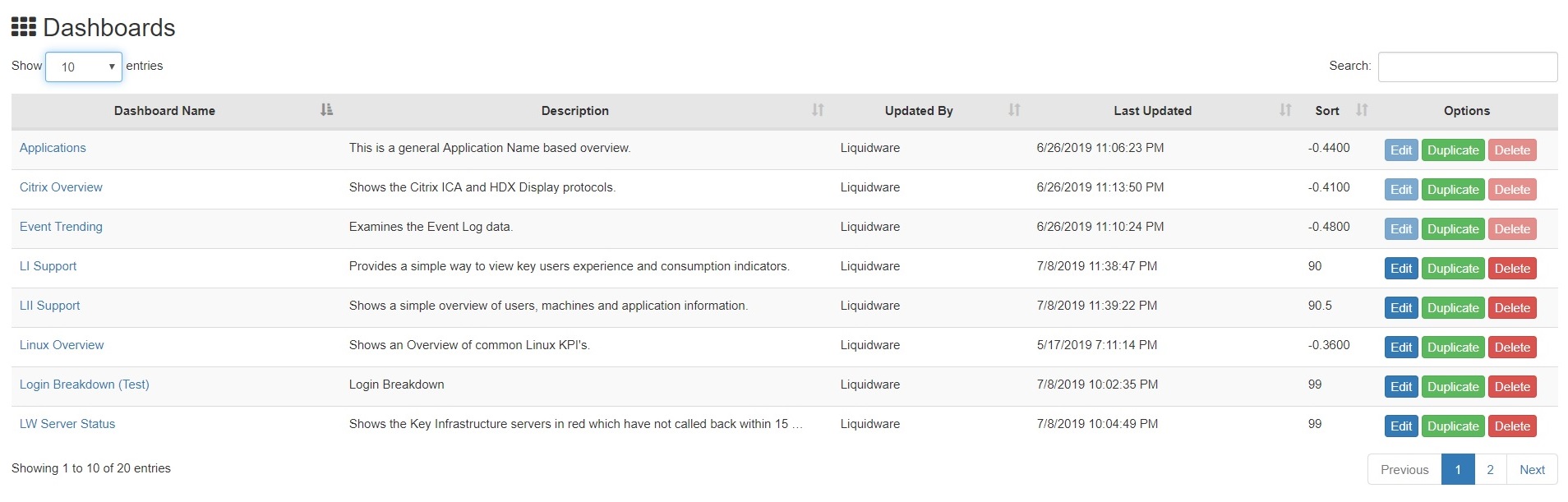
Overall
the Stratusphere UX dashboards have received updates that make it easier for
administrative users to create views that support core areas of focus. For
example, dashboard, widget and datasource entities can now be easily customized
using “save as” and “duplicate” functionality (see above). This feature also preserves
the original out-of-the-box dashboards, widgets, and datasources owned by Liquidware
and prevents them from being edited or deleted.
A Focus on
Usability
Stratusphere UX also brings greater workspace
visibility with this release. Advanced mode inspectors have received enhanced
visibility in the area of drill down and the filtering of metrics and
information. Throughout the advanced mode inspectors, administrative users can
now opt to filter search results as they drill into actionable table views.
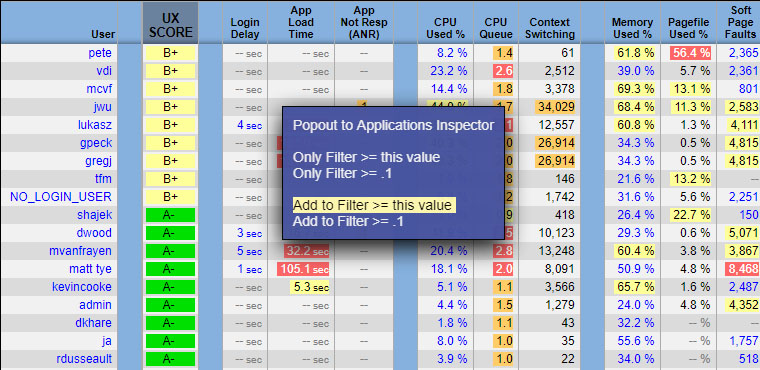
Context aware menus now appear with options to provide drill down with
filtering (see below), pop out application or user 360 views. These options
allow for more intelligent data navigation to support troubleshooting as well
as better-guided workflows to support help desk use cases.
More
Intelligent Process Optimization and More
Greater control and more granular management
options were added to the Stratusphere UX 6.1.3 process optimization feature.
Process optimization was originally introduced to Stratusphere UX last Fall, and
with this release, we’ve optimized its behavior and provided greater control and
more intelligence. It’s now more flexible while remaining a powerful value-add
for Stratusphere UX. Learn more about Stratusphere
UX Process Optimization.
Additionally, version 6.1.3 of Stratusphere UX
adds official Connector ID Key support for Microsoft Windows Server 2019. And
we’ve recently showcased our ability to support Microsoft Windows 10
Mult-Session and Windows Virtual Desktop (WVD) both in terms of assessment as
well as to provide monitoring and operational support for the platform. Learn
more about our use cases and support the Microsoft
Windows platform.
This release also provides a native agent for
Stratodesk NoTouch OS-based devices. Further, Stratusphere appliances have
always supported on-premises installation of its virtual appliances, on all
major hypervisor platforms. This release also supports integration and
licensing through Amazon Marketplace, in addition to the pre-existing
bring-your-own-license (BYOL) available on the Amazon Cloud.
We’re quite
excited about Stratusphere UX and think you’ll be too. I’d love to hear about
your next generation efforts and where visibility can play a role. Write me and
share your end user challenges as it relates to meeting expectations and delivering
the optimal user experience.